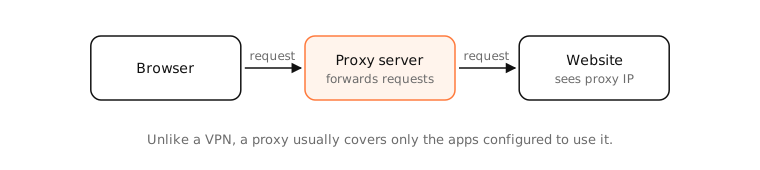
A proxy server is an intermediary that makes network requests on your behalf: your app connects to the proxy, and the proxy connects to the website. Sites see the proxy's IP. Unlike a VPN, a proxy usually handles only the apps or protocols configured to use it, and doesn't necessarily encrypt anything.
How it works
Types of proxy
- HTTP/HTTPS proxy: handles web traffic. For HTTPS, the browser sends
CONNECT host:443and the proxy relays the encrypted stream without reading it. - SOCKS5 proxy: relays any TCP (and UDP) connection; used by SSH tunnels (
ssh -D) and Tor. - Transparent proxy: intercepts traffic without any configuration on your device, as on some company and school networks.
- Reverse proxy: sits in front of servers rather than clients; a different job altogether.
Common uses
Company filtering and caching, reaching a network through a jump host, scraping from different IPs, and debugging tools like Charles or Proxyman that inspect your own app's traffic.
Proxy vs VPN
A VPN captures all traffic at the operating-system level and encrypts it to the server. A proxy covers only what's pointed at it, and plain HTTP or SOCKS proxies don't encrypt the hop to the proxy.
Side by side
| Proxy | VPN | |
|---|---|---|
| Covers | Configured apps or protocols | All traffic |
| Encrypts to server | Not necessarily | Yes |
| Set up in | App or system proxy settings | VPN app or system VPN |
| Hides your IP | From sites using it | From all sites |
| Typical use | Filtering, debugging, scraping | Privacy, remote access |
Examples
ssh -D 1080 user@servercreates a SOCKS proxy on your Mac; set a browser to uselocalhost:1080and its traffic exits from the server.curl -x http://proxy.example.com:8080 https://example.comsends one request through a proxy.
On a Mac
System Settings › Network › Wi-Fi › Details › Proxies sets system-wide proxies; Safari and most apps follow them. scutil --proxy prints the current settings. An unexpected proxy here is worth investigating: adware sometimes sets one.
See it in the app
LightAtom's connections view shows when apps connect to a proxy instead of directly to sites, and which apps ignore it.
Frequently asked questions
What is a proxy server used for?
Forwarding requests on behalf of clients: filtering, caching, hiding client IPs, reaching restricted networks and debugging traffic.
Is a proxy the same as a VPN?
No. A proxy relays traffic for apps that use it; a VPN tunnels and encrypts all of the device's traffic.
How do I check proxy settings on a Mac?
System Settings › Network › your connection › Details › Proxies, or run scutil --proxy in Terminal.
Are free proxies safe?
Often not. The operator can log and, for plain HTTP, modify your traffic. Use only proxies you trust.