HTTP status codes are three-digit numbers a web server returns with every response. 2xx means success, 3xx a redirect, 4xx a problem with the request (like 404 Not Found or 403 Forbidden) and 5xx a server failure (like 500 or 502 Bad Gateway).
How it works
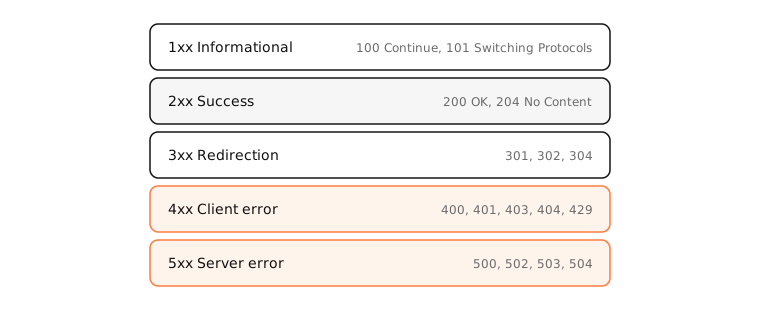
The first line of every HTTP response contains the status: HTTP/2 200 or HTTP/1.1 404 Not Found. The first digit gives the class.
2xx: success
- 200 OK: the normal response.
- 201 Created: a resource was created (APIs).
- 204 No Content: success with no body.
3xx: redirection
- 301 Moved Permanently vs 302 Found: 301 says the move is permanent, so browsers cache it and search engines transfer rankings; 302 is temporary. 307 and 308 are the temporary and permanent versions that keep the request method (a POST stays a POST).
- 304 Not Modified: your cached copy is still valid.
4xx: client errors
- 400 Bad Request, 401 Unauthorized (log in), 403 Forbidden (no access), 404 Not Found, 405 Method Not Allowed, 408 Request Timeout, 410 Gone, 413 Content Too Large, 414 URI Too Long (the URL exceeds the server's limit, often from huge query strings), 415 Unsupported Media Type, 418 I'm a teapot, 422 Unprocessable Content, 429 Too Many Requests, 451 Unavailable For Legal Reasons (blocked due to a legal demand, a nod to Fahrenheit 451).
5xx: server errors
- 500 Internal Server Error, 502 Bad Gateway, 503 Service Unavailable, 504 Gateway Timeout.
- Cloudflare adds its own 520–527 for problems reaching the origin server; nginx logs a non-standard 499 when the client gives up.
Side by side
| Code | Meaning | Whose problem |
|---|---|---|
| 200 | OK | — |
| 301 / 308 | Permanent redirect | — |
| 302 / 307 | Temporary redirect | — |
| 304 | Not Modified (use cache) | — |
| 400 | Bad Request | Client |
| 401 | Unauthorized: log in | Client |
| 403 | Forbidden | Client / site rules |
| 404 | Not Found | Client / broken link |
| 429 | Too Many Requests | Client (rate limit) |
| 500 | Internal Server Error | Server |
| 502 | Bad Gateway | Server (behind a proxy) |
| 503 | Service Unavailable | Server (overload, maintenance) |
| 504 | Gateway Timeout | Server (slow backend) |
Examples
See any site's status code from a Mac:
$ curl -s -o /dev/null -w '%{http_code}\n' https://example.com
200
$ curl -sI http://github.com | head -1
HTTP/1.1 301 Moved Permanently
Every error code on this list that people commonly run into has its own fix guide; follow the related links below.
On a Mac
In Safari or Chrome, open the developer tools (⌥⌘I) › Network and reload: the Status column shows every request's code. In Terminal, curl -I URL shows the status line and headers; add -L to follow redirects and see each hop's code.
See it in the app
LightAtom shows that an app connects to a server; when an app reports HTTP errors, its connections view tells you which host it was talking to.
Frequently asked questions
What are HTTP status codes?
Three-digit codes in every HTTP response that say how the request went: 2xx success, 3xx redirect, 4xx client error, 5xx server error.
What is the difference between 301 and 302?
301 is a permanent redirect: browsers cache it and search engines move rankings to the new URL. 302 is temporary: the original URL stays the canonical one.
Which HTTP errors are my fault?
4xx codes point to the request: a wrong URL (404), missing login (401), no permission (403) or too many requests (429). 5xx codes are the server's problem.
What does 451 mean?
Unavailable For Legal Reasons: the server is refusing the resource because of a legal demand, such as a court order or regional law.
What does 414 URI Too Long mean?
The URL is longer than the server will accept, usually because of a very long query string. Send the data in a POST body instead.