A URL (Uniform Resource Locator) is the address of a resource on the internet, such as https://www.example.com/docs/page. It says which protocol to use (https), which server to contact (www.example.com) and which resource to ask for (/docs/page).
How it works
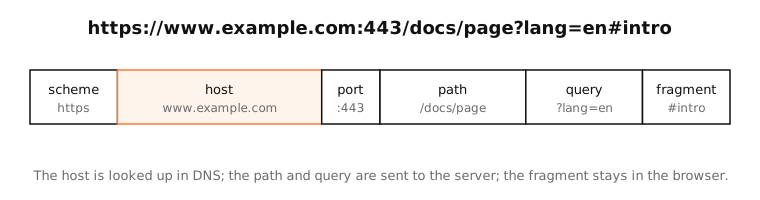
The parts
- Scheme (
https): the protocol. https is HTTP over TLS; others include http, ftp, mailto and app-specific schemes. - Host (
www.example.com): the server's name, looked up in DNS to get its IP address. It can also be an IP address. - Port (
:443): usually omitted, because each scheme has a default (443 for https, 80 for http). - Path (
/docs/page): which resource on the server. - Query (
?lang=en): parameters, as key=value pairs joined with &. - Fragment (
#intro): a position within the page. It's never sent to the server.
What happens when you open a URL
- The browser looks up the host in DNS.
- It connects to that IP on the port, and for https sets up TLS, checking the certificate matches the host.
- It sends an HTTP request for the path and query.
- The server responds, and the browser scrolls to the fragment.
URL, URI, domain
A domain is just the host part's name (example.com). A URI is the broader category of identifiers; every URL is a URI.
Examples
| URL | Notes |
|---|---|
https://apple.com |
Scheme and host; path defaults to / |
http://192.168.1.1 |
Host as an IP address: your router's admin page |
http://localhost:3000/api?debug=1 |
A local dev server on port 3000 with a query |
mailto:support@example.com |
Not a web page: opens your mail app |
https://example.com/search?q=dns%20lookup |
%20 encodes a space |
On a Mac
Safari hides parts of the URL by default; turn on Safari › Settings › Advanced › Show full website address to see it all. In Terminal, curl -v URL shows each step: DNS resolution, connection to the port, TLS, and the request line with the path and query.
See it in the app
LightAtom's connections view shows the host part of the URLs your apps request: the name they looked up, beside each connection.
Frequently asked questions
What is a URL in simple terms?
A web address: it tells your browser which protocol to use, which server to contact and which page or file to ask for.
What is the difference between a URL and a domain name?
The domain (example.com) is part of the URL. The URL adds the scheme, path and other parts: https://example.com/docs.
Is the part after # sent to the server?
No. The fragment is handled by the browser, usually to scroll to a section. The server never receives it.
Why do some URLs contain %20?
Characters like spaces aren't allowed in URLs, so they're percent-encoded: a space becomes %20.