DNS (Domain Name System) is the internet's directory: it translates names like apple.com into IP addresses like 17.253.144.10. Your device asks a DNS resolver, which finds the answer from the domain's authoritative servers and caches it, usually in milliseconds.
How it works
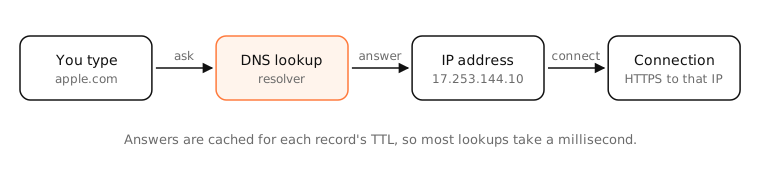
A lookup, step by step
- You type apple.com. Your Mac checks its own cache.
- If it's not cached, macOS (mDNSResponder) asks your resolver, usually your router or a public resolver like 1.1.1.1.
- The resolver, if it doesn't have the answer cached, asks a root server where .com is handled, then a .com server where apple.com is handled, then apple.com's authoritative server for the record.
- The answer comes back with a TTL; every cache along the way keeps it that long.
A hierarchy of names
Names are read right to left: the root (.), the top-level domain (com), the domain (apple), subdomains (www). Each level delegates to the next with NS records, which is how millions of organisations manage their own names.
More than addresses
DNS also stores mail servers (MX), aliases (CNAME), text for email security and verification (TXT), and more.
Privacy
Traditional DNS is unencrypted: your network and resolver see every name you look up. DNS over HTTPS (DoH) and DNS over TLS encrypt it; DNSSEC protects against forged answers.
Examples
$ dig +short apple.com
17.253.144.10
$ dig +short www.apple.com
www-apple-com.v.aaplimg.com.
…
www.apple.com is a CNAME to Apple's CDN, whose name then resolves to addresses close to you.
On a Mac
- System Settings › Network › Details › DNS lists your DNS servers.
scutil --dnsshows every resolver macOS uses;dscacheutil -q host -a name apple.comresolves a name the way apps do.sudo dscacheutil -flushcache; sudo killall -HUP mDNSResponderclears the cache.
See it in the app
LightAtom's connections view labels each connection with the domain behind its IP address, using the DNS answers your Mac receives.
Frequently asked questions
What does DNS stand for?
Domain Name System. It maps domain names to IP addresses and other information.
What is DNS used for?
Finding the IP address behind a name so your device can connect, as well as finding mail servers, verifying domains and more.
What happens when DNS doesn't work?
Websites and apps can't find servers by name, so nothing loads even though your connection is fine. Errors like DNS_PROBE_FINISHED_NXDOMAIN appear.
Can I change my DNS server?
Yes, in System Settings › Network › Details › DNS on a Mac, or on your router for all devices. Public resolvers include 1.1.1.1, 8.8.8.8 and 9.9.9.9.
Is DNS private?
Plain DNS isn't encrypted, so your network and resolver can see names you look up. Encrypted DNS (DoH/DoT) and choosing a trusted resolver improve privacy.