A DNS server answers questions about domain names. A resolver (the one your device uses, like 1.1.1.1 or your router) finds answers for you; authoritative servers hold the official records for a domain. Together they turn names like apple.com into IP addresses.
How it works
Recursive resolvers
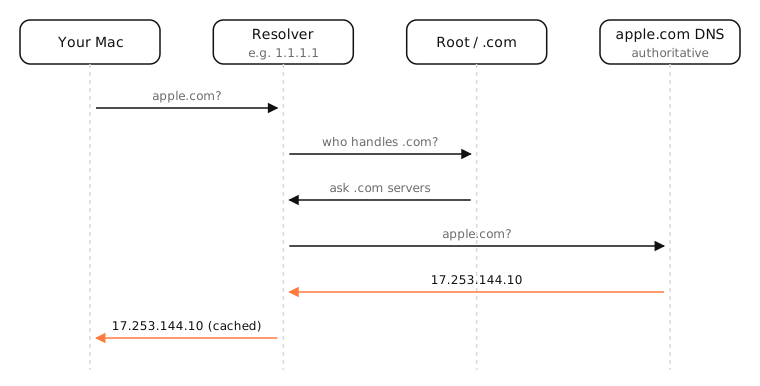
Your Mac sends every lookup to a recursive resolver: your ISP's, a public one like 1.1.1.1, 8.8.8.8 or 9.9.9.9, or your router, which usually forwards to the ISP's. The resolver does the work of finding the answer and caches it for the record's TTL, so the next lookup is instant.
Authoritative servers
If the answer isn't cached, the resolver asks in steps:
- A root server says which servers handle
.com. - A .com TLD server says which servers handle
apple.com. - apple.com's authoritative server returns the actual record: 17.253.144.10.
There are 13 named root server identities (a.root-servers.net to m.root-servers.net), each run as hundreds of anycast instances worldwide.
Why the choice of resolver matters
- Speed: a nearby, well-cached resolver answers faster.
- Privacy: the resolver sees every name you look up.
- Filtering: some resolvers block malware or ads; some ISPs redirect typos to ad pages.
- Reliability: if the resolver is down, nothing loads by name.
Side by side
| Recursive resolver | Authoritative server | |
|---|---|---|
| Who uses it | Your devices | Resolvers |
| What it does | Finds and caches answers | Holds a domain's records |
| Examples | 1.1.1.1, 8.8.8.8, your ISP, your router | a.ns.apple.com, Cloudflare DNS for a site |
| Set by | You, your router or your ISP | The domain's owner, via NS records |
Examples
dig apple.com shows both kinds at once:
;; ANSWER SECTION:
apple.com.		542	IN	A	17.253.144.10
;; AUTHORITY SECTION:
apple.com.		16592	IN	NS	a.ns.apple.com.
;; SERVER: 192.168.1.1#53(192.168.1.1)
SERVER is the resolver that answered (here the router); the NS lines are apple.com's authoritative servers.
On a Mac
- System Settings › Network › Details › DNS lists the DNS servers you've set; greyed-out entries came from the router.
scutil --dnsshows every resolver macOS is actually using, including ones added by VPNs.- Change the resolver in that DNS panel, then flush the cache:
sudo dscacheutil -flushcache; sudo killall -HUP mDNSResponder.
See it in the app
LightAtom's connections view labels each connection with the name your app asked your DNS server for.
Frequently asked questions
What is my DNS server?
Usually your router, which forwards to your ISP's resolver. The What is my DNS server tool shows which resolver actually handles your lookups.
What is the difference between a DNS server and a DNS resolver?
A resolver is the kind of DNS server your device asks; it finds answers for you. Authoritative DNS servers hold the records. Both are DNS servers.
Which DNS server is best?
It depends on your priorities: Cloudflare (1.1.1.1) and Google (8.8.8.8) are fast and reliable, Quad9 (9.9.9.9) blocks malware. Test which is fastest from your connection.
What happens if my DNS server is down?
Websites stop loading by name even though your connection works. Switching to a public resolver fixes it.