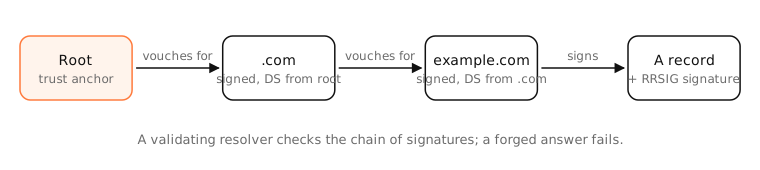
DNSSEC (DNS Security Extensions) adds cryptographic signatures to DNS records. A validating resolver checks a chain of signatures from the DNS root down to the domain, so forged or altered answers are rejected. It proves authenticity; it doesn't encrypt or hide your lookups.
How it works
New record types
- DNSKEY: the zone's public keys.
- RRSIG: a signature over a set of records.
- DS: a hash of a child zone's key, published in the parent zone.
- NSEC/NSEC3: signed proof that a name doesn't exist.
The chain of trust
Resolvers trust one key: the root zone's key-signing key (the trust anchor). The root signs a DS record for .com; .com signs a DS record for example.com; example.com signs its own records. A validating resolver follows that chain. If any signature fails, it returns SERVFAIL instead of a possibly forged answer.
What DNSSEC protects against
Cache poisoning and spoofed answers, where an attacker tricks a resolver into accepting a fake IP for a domain.
What it doesn't do
- It doesn't encrypt DNS: your lookups remain visible. That's what DNS over HTTPS and TLS do.
- It only helps when the domain signs its zone and the resolver validates.
- Misconfigured signatures (expired keys, broken DS records) make a domain unreachable for validating resolvers.
Examples
dig +dnssec isc.org returns RRSIG records alongside the answer, and the ad (authenticated data) flag appears in the header when the resolver validated it:
;; flags: qr rd ra ad; QUERY: 1, ANSWER: 2, …
Public resolvers such as 1.1.1.1, 8.8.8.8 and 9.9.9.9 validate DNSSEC. dig +cd asks them to skip validation, a quick way to test whether a SERVFAIL comes from broken DNSSEC.
On a Mac
macOS uses whatever DNSSEC validation your resolver does; choose a validating resolver like 1.1.1.1 or 9.9.9.9 under System Settings › Network › Details › DNS. Use dig +dnssec in Terminal to inspect signatures.
See it in the app
In LightAtom, a domain with broken DNSSEC never gets a connection, so its name never appears in the connections view.
Frequently asked questions
Does DNSSEC encrypt DNS?
No. It signs records so tampering can be detected, but queries and answers remain readable. DNS over HTTPS or TLS encrypts them.
Should I enable DNSSEC on my domain?
If your DNS host supports it with automatic key management, yes: it protects visitors using validating resolvers. Misconfiguration can take your domain offline, so use a host that automates it.
Why does a site fail with SERVFAIL on some resolvers only?
Often broken DNSSEC: validating resolvers reject the bad signatures while non-validating ones don't notice. dig +cd confirms it.
Is DNSSEC widely used?
Most top-level domains are signed and big public resolvers validate, but only a minority of individual domains sign their zones.