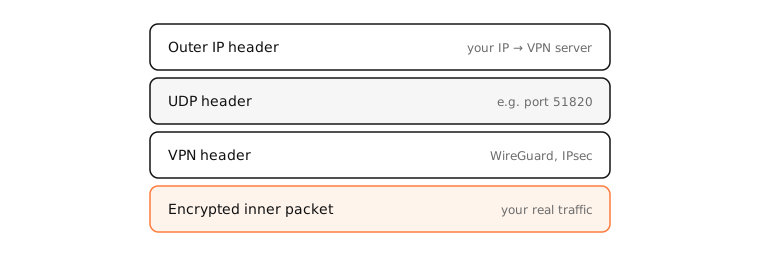
A VPN tunnel is an encrypted connection between your device and a VPN server that carries your traffic inside it. Each original packet is encrypted and wrapped (encapsulated) in an outer packet addressed to the VPN server, which unwraps it and sends it on to its real destination.
How it works
Encapsulation
Your Mac creates a virtual network interface (a utun device). Apps send packets to it as normal; the VPN software encrypts each one and puts it inside a new UDP or TCP packet to the server. The server decrypts it and forwards the original packet to the internet, then does the reverse for replies.
The extra headers reduce the MTU inside the tunnel, typically to around 1,420 bytes for WireGuard.
Full vs split tunnel
- Full tunnel: all traffic goes through the VPN. Best for privacy on untrusted networks.
- Split tunnel: only some traffic does, such as company subnets or chosen apps; the rest goes directly. Common for work VPNs, and useful for keeping local printers and streaming working.
Leaks
A tunnel protects only what's routed into it. DNS leaks (lookups going to your ISP), IPv6 leaks (a VPN that tunnels only IPv4) and apps that bind directly to Wi-Fi can all bypass it.
Examples
$ netstat -rn -f inet | grep -E '^(default|0/1|128.0/1)'
0/1                10.2.0.1           UGScg       utun4
default            192.168.1.1        UGScg         en0
128.0/1            10.2.0.1           UGScg       utun4
A common full-tunnel trick: two routes, 0/1 and 128.0/1, cover every address and beat the default route to Wi-Fi, without replacing it.
On a Mac
ifconfig | grep -A2 utun lists tunnel interfaces; netstat -rn shows which destinations are routed into them. In System Settings › VPN, many VPN apps show a split-tunnelling or “send all traffic” option.
See it in the app
LightAtom's Map shows where the servers your apps talk to are; the VPN client's own connection shows where the tunnel goes.
Frequently asked questions
What is a VPN tunnel?
An encrypted connection to a VPN server through which your device sends its traffic, wrapped inside packets the network between can't read.
What is split tunnelling?
Sending only some traffic through the VPN, like work systems or selected apps, while the rest uses your normal connection.
Is split tunnelling safe?
It's safe for what goes through the tunnel; everything else is as exposed as without a VPN. Use a full tunnel on untrusted Wi-Fi.
How do I know if my traffic goes through the tunnel?
Check that curl -s https://api.ipify.org shows the VPN's address and run a DNS and IPv6 leak test.