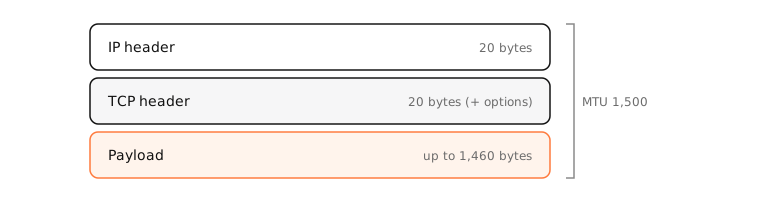
MTU (maximum transmission unit) is the largest IP packet a network link can carry in one piece: 1,500 bytes on Ethernet and Wi-Fi. Tunnels and some connections lower it. Packets larger than the path's MTU must be fragmented or are dropped.
How it works
Typical values
- 1,500: Ethernet and Wi-Fi.
- 1,492: PPPoE DSL and some fibre connections (8 bytes of PPPoE header).
- ~1,420: WireGuard tunnels; IPsec and other VPNs vary.
- 9,000: “jumbo frames” on some local networks and NAS setups.
The TCP equivalent is the MSS (maximum segment size): MTU minus 40 bytes of IPv4 and TCP headers, so 1,460 on a 1,500 link.
Path MTU discovery
The smallest MTU along the route decides. Hosts send packets with “don't fragment” set; a router that can't forward one sends back ICMP “fragmentation needed”, and the sender shrinks its packets.
MTU black holes
If a firewall drops those ICMP messages, the sender never learns. The TCP handshake and small requests work, but full-size packets vanish: pages half-load, downloads stall, SSH hangs after login, VPNs connect but nothing loads. Lowering the MTU or enabling MSS clamping on the router fixes it.
Examples
Find the largest packet that passes unfragmented (payload + 28 bytes of headers = MTU):
$ ping -D -s 1472 -c 1 1.1.1.1
1480 bytes from 1.1.1.1: icmp_seq=0 ttl=57 time=14.4 ms
$ ping -D -s 1473 -c 1 1.1.1.1
ping: sendto: Message too long
1,472 + 28 = 1,500: the full Ethernet MTU works on this path.
On a Mac
networksetup -getMTU en0shows the current value;sudo networksetup -setMTU en0 1492changes it.- Or in System Settings › Network › Wi-Fi or Ethernet › Details › Hardware, set MTU to Custom.
ifconfig utun0shows a VPN tunnel's MTU.
See it in the app
LightAtom's connections view shows each connection's live rate, so one that stays open with no traffic is easy to spot.
Frequently asked questions
What is the default MTU on a Mac?
1,500 bytes for Wi-Fi and Ethernet.
Should I change my MTU?
Only to fix a specific problem, such as stalled transfers on PPPoE or through a VPN. A wrong value can make things slower.
What is the difference between MTU and MSS?
MTU is the largest IP packet; MSS is the largest TCP payload inside it, usually MTU minus 40 bytes.
How do I find the right MTU?
Ping with “don't fragment” (ping -D -s size) and lower the size until it succeeds, then add 28 bytes.