TLS (Transport Layer Security) is the protocol that encrypts connections and verifies the server's identity with a certificate. It secures HTTPS, email and most app traffic. SSL was its predecessor; all SSL versions are broken and disabled, but “SSL certificate” is still the common name.
How it works
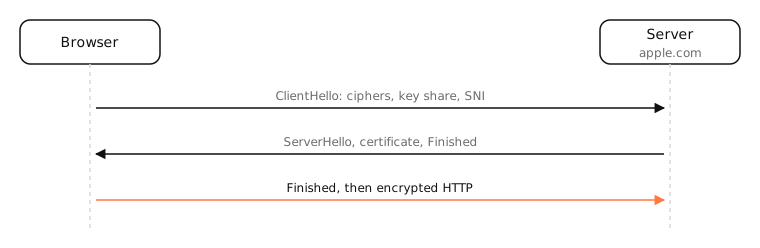
The handshake (TLS 1.3)
- ClientHello: supported ciphers, a key share, and the server name (SNI) the client wants.
- ServerHello: the server picks a cipher, sends its key share, its certificate and a signature proving it holds the private key.
- Both sides derive the same session keys; everything after is encrypted. That's one round trip; TLS 1.2 needed two.
Certificates
A certificate binds a domain name to a public key, signed by a certificate authority (CA) your device trusts. Your Mac checks the chain up to a trusted root, the name, and the dates. Since March 2026, public certificates can be valid for at most 200 days, falling further in coming years, so automatic renewal (as with Let's Encrypt) is the norm.
Versions
- SSL 2.0, 3.0, TLS 1.0, 1.1: obsolete and disabled in browsers.
- TLS 1.2: still widely supported.
- TLS 1.3: current; faster and removes old, weak options.
Beyond the web
TLS secures SMTP, IMAP, DNS over TLS and DoH, VPNs like OpenVPN, and QUIC, which has TLS 1.3 built in.
Side by side
| SSL (2.0, 3.0) | TLS 1.2 | TLS 1.3 | |
|---|---|---|---|
| Released | 1995–1996 | 2008 | 2018 |
| Status | Broken, disabled | Supported | Current, preferred |
| Handshake | 2 round trips | 2 round trips | 1 round trip (0 on resume) |
| Forward secrecy | Optional | Optional | Always |
| Weak ciphers | Many | Possible | Removed |
Examples
$ openssl s_client -connect apple.com:443 -servername apple.com </dev/null 2>/dev/null \
    | grep -E 'Protocol|Cipher|subject=|issuer='
This prints the negotiated TLS version and cipher, and who the certificate was issued to and by.
On a Mac
- Safari: click the padlock › Show Certificate.
- Keychain Access › System Roots lists the CAs your Mac trusts.
curl -v https://example.comshows the TLS version and certificate during connection.
Try it
Decoded in your browser. The text you paste is never uploaded.
See it in the app
LightAtom's connections view shows which connections use TLS ports like 443 and 993, and which apps still send traffic in plain text.
Frequently asked questions
What is the difference between SSL and TLS?
TLS is the successor to SSL. All SSL versions are insecure and disabled; today's “SSL certificates” are used with TLS.
What does TLS protect?
The contents of a connection, from eavesdropping and tampering, and you from impostor servers, through certificate checks.
Which TLS version should I use?
TLS 1.3 where possible, with TLS 1.2 as a fallback. Disable 1.0 and 1.1.
What is SNI?
Server Name Indication: the domain the client sends at the start of the handshake so a server hosting many sites can choose the right certificate.