Port forwarding is a router rule that sends incoming connections on a public port to a device inside your network, like sending port 25565 to your Mac running a Minecraft server. Without it, your router's NAT drops unsolicited inbound connections.
How it works
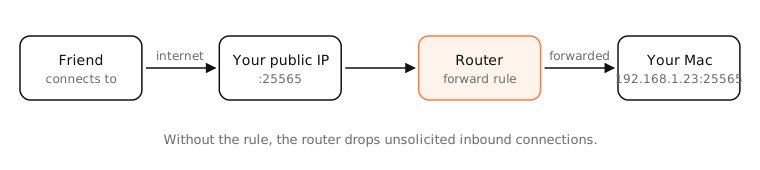
Your router shares one public IP among your devices with NAT. Outgoing connections work automatically, because the router remembers which device started each one. But a new connection arriving from the internet has no matching entry, so the router doesn't know where to send it and drops it.
A port-forwarding rule fills that gap: “anything arriving on TCP port 25565 goes to 192.168.1.23:25565”.
UPnP and NAT-PMP
Apps and game consoles can ask the router to create forwarding rules automatically with UPnP or NAT-PMP/PCP. Convenient, but any program on your network can open ports, so some people turn it off.
DMZ
A router's DMZ setting forwards all unmatched ports to one device. It exposes that device completely; avoid it except for a device designed to be exposed.
When forwarding can't work
If your ISP uses carrier-grade NAT, you don't have your own public IPv4 address, so forwarding on your router achieves nothing. Use IPv6, a tunnel service (Tailscale, Cloudflare Tunnel) or ask the ISP for a public IP.
Examples
| Purpose | Port | Forward to |
|---|---|---|
| Minecraft server | TCP 25565 | your Mac |
| Plex media server | TCP 32400 | the Plex host |
| Web server | TCP 443 | the server |
Before forwarding, give the device a DHCP reservation so its local address doesn't change and break the rule.
On a Mac
- Find your Mac's local IP in System Settings › Network › Details › TCP/IP, and reserve it in the router.
- Make sure the app listens on all interfaces, not only 127.0.0.1 (
sudo lsof -nP -iTCP:PORT -sTCP:LISTENshould show*:PORT). - Allow the app in System Settings › Network › Firewall › Options if the firewall is on.
- Add the rule in your router, then test from outside with the port checker.
See it in the app
LightAtom's Ports view shows whether the app is listening on all interfaces (reachable) or only localhost, the most common reason a forward doesn't work.
Frequently asked questions
Is port forwarding safe?
It's as safe as the service you expose. Forward only what you need, keep the software updated, and use strong authentication. Remove rules you no longer use.
What is UPnP?
Universal Plug and Play lets devices ask the router to open ports automatically. Convenient for games and consoles, but any app on your network can use it.
Why doesn't my port forwarding work?
Common causes: the app isn't listening on all interfaces, the device's local IP changed, the Mac firewall blocks it, or your ISP uses CGNAT.
What is a DMZ on a router?
A setting that forwards every unrequested port to one device. It exposes that device fully to the internet, so it's rarely a good idea.