A port is a number from 0 to 65535 that identifies a specific service or app on a device. The IP address gets data to the right computer; the port gets it to the right program, such as 443 for HTTPS or 22 for SSH.
How it works
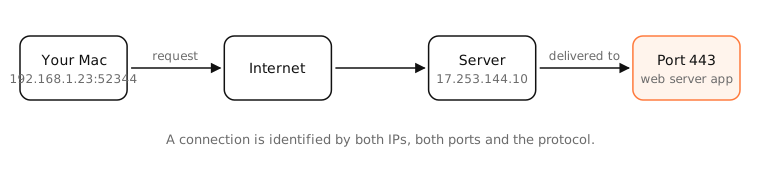
TCP and UDP both use 16-bit port numbers. A connection is identified by five things: protocol, source IP, source port, destination IP, destination port. That's why one server on port 443 can handle thousands of connections at once: each client has a different IP and port combination.
Listening ports and client ports
- A server listens on a fixed, known port, like a web server on 443.
- A client gets a temporary ephemeral port from the operating system for each outgoing connection (on macOS, typically from 49152 to 65535).
Port ranges
- 0–1023: well-known ports, for standard services (22 SSH, 53 DNS, 80 HTTP, 443 HTTPS).
- 1024–49151: registered ports, assigned to specific applications (3306 MySQL, 5432 PostgreSQL).
- 49152–65535: dynamic ports, used for ephemeral client ports.
Port vs socket
A socket is one endpoint of a connection inside an app: an IP address, a port and a protocol. A port is just the number. Many sockets can share a port: a server's listening socket and every connection it accepted all use port 443.
Examples
| Port | Protocol | Service |
|---|---|---|
| 22 | TCP | SSH |
| 53 | UDP/TCP | DNS |
| 80 | TCP | HTTP |
| 443 | TCP/UDP | HTTPS, HTTP/3 |
| 5353 | UDP | Bonjour (mDNS) |
| 5000, 7000 | TCP | AirPlay Receiver on macOS |
When Safari opens https://apple.com, the connection is from your Mac's port (say 52344) to Apple's port 443.
On a Mac
To see what's listening on your Mac: sudo lsof -nP -iTCP -sTCP:LISTEN. On a recent Mac you'll typically find ControlCenter on 5000 and 7000 (AirPlay Receiver), rapportd on a high port (Continuity), and whatever development servers you run.
A port listening on all interfaces (*:5000) can be reached by other devices on your network; one on 127.0.0.1 only by your Mac. The macOS firewall (System Settings › Network › Firewall) controls which apps may accept incoming connections.
See it in the app
LightAtom's Ports view lists every listening TCP and bound UDP port on your Mac, the app and user behind it, and whether it's reachable from the network or only localhost.
Frequently asked questions
What is a port in simple terms?
If an IP address is a building's street address, a port is the apartment number. It tells the computer which program should receive the data.
How many ports are there?
65,536 per protocol: 0 to 65535 for TCP, and the same again for UDP.
What is the difference between a port and a socket?
A port is a number. A socket is an endpoint that combines an IP address, a port and a protocol, used by an app to send or receive data.
Are open ports dangerous?
An open port is as safe as the program listening on it. Close ports you don't need, keep software updated, and don't expose services to the internet without reason.