Ports 0–1023 are the well-known ports, assigned by IANA to core services: 22 for SSH, 53 for DNS, 80 for HTTP and 443 for HTTPS. Ports 1024–49151 are registered ports (like 3306 for MySQL and 3389 for RDP), and 49152–65535 are dynamic ports used temporarily by clients.
How it works
Three ranges
- 0–1023, well-known: standard services. Listening on them normally needs root; since Mojave, macOS lets any user listen on them on all interfaces (0.0.0.0), but not on a specific address like 127.0.0.1.
- 1024–49151, registered: assigned to specific applications, though many are used informally.
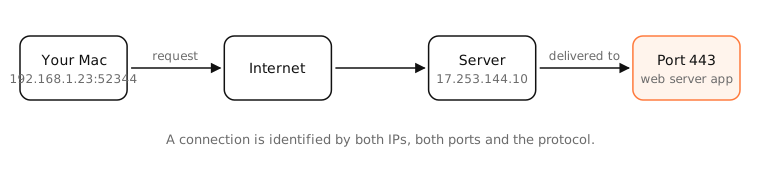
- 49152–65535, dynamic or ephemeral: your Mac picks one of these as the source port for each outgoing connection.
TCP and UDP are separate
Port 53/UDP and 53/TCP are different sockets. Most services use one protocol; DNS uses both, and HTTP/3 uses UDP 443 while HTTP/1.1 and HTTP/2 use TCP 443.
A port number is a convention, not a guarantee
Anything can listen on any port. Traffic on 443 is usually HTTPS, but VPNs and tunnels use it too precisely because it's rarely blocked. To know what's really behind a port, look at the process.
Common ports
| Port | Protocol | Service | Notes |
|---|---|---|---|
| 20, 21 | TCP | FTP (data, control) | Unencrypted file transfer; avoid |
| 22 | TCP | SSH, SFTP, SCP | Remote login (Remote Login on a Mac) |
| 23 | TCP | Telnet | Unencrypted; legacy devices |
| 25 | TCP | SMTP | Mail between servers; often blocked by ISPs |
| 53 | UDP/TCP | DNS | Name lookups |
| 67, 68 | UDP | DHCP | Server, client |
| 69 | UDP | TFTP | Network boot, device firmware |
| 80 | TCP | HTTP | Unencrypted web |
| 88 | TCP/UDP | Kerberos | Active Directory sign-in |
| 110 | TCP | POP3 | Mail download (995 with TLS) |
| 123 | UDP | NTP | Time sync (time.apple.com) |
| 137–139 | TCP/UDP | NetBIOS | Legacy Windows sharing |
| 143 | TCP | IMAP | Mail (993 with TLS) |
| 161, 162 | UDP | SNMP | Device monitoring, traps |
| 179 | TCP | BGP | Routing between networks |
| 389 | TCP | LDAP | Directories (636 with TLS) |
| 443 | TCP/UDP | HTTPS, HTTP/3 (QUIC) | Encrypted web; most app traffic |
| 445 | TCP | SMB | File sharing (Finder › Connect to Server) |
| 465 | TCP | SMTP over TLS | Mail submission, implicit TLS |
| 500, 4500 | UDP | IKE, IPsec NAT-T | IPsec VPNs (built into macOS) |
| 514 | UDP | Syslog | Log collection |
| 548 | TCP | AFP | Legacy Apple file sharing |
| 587 | TCP | SMTP submission | Sending mail from apps |
| 631 | TCP | IPP, CUPS | Printing |
| 853 | TCP | DNS over TLS | Encrypted DNS |
| 993 | TCP | IMAPS | Mail with TLS |
| 995 | TCP | POP3S | Mail with TLS |
| 1194 | UDP | OpenVPN | VPN |
| 1433 | TCP | Microsoft SQL Server | Database |
| 1883, 8883 | TCP | MQTT | IoT messaging (8883 with TLS) |
| 3000 | TCP | Dev servers | Node, Rails, React (by convention) |
| 3306 | TCP | MySQL, MariaDB | Database |
| 3389 | TCP/UDP | RDP | Windows Remote Desktop |
| 3478 | UDP | STUN, TURN | Calls and WebRTC through NAT |
| 5000, 7000 | TCP | AirPlay Receiver | Used by macOS (often collides with dev servers) |
| 5060, 5061 | TCP/UDP | SIP | VoIP signalling |
| 5173 | TCP | Vite | Dev server |
| 5223 | TCP | Apple Push (APNs) | Push notifications |
| 5353 | UDP | mDNS, Bonjour | Local discovery |
| 5432 | TCP | PostgreSQL | Database |
| 5900 | TCP | VNC, Screen Sharing | Remote screen on a Mac |
| 6379 | TCP | Redis | Database, cache |
| 8080 | TCP | HTTP alternate | Proxies, dev servers |
| 8443 | TCP | HTTPS alternate | Admin panels, dev servers |
| 9100 | TCP | Raw printing | JetDirect printers |
| 27017 | TCP | MongoDB | Database |
| 51820 | UDP | WireGuard | VPN (default) |
Examples
$ lsof -nP -iTCP -sTCP:LISTEN
COMMAND     PID  USER  FD  TYPE  …  NAME
ControlCe   612  me    9u  IPv4  …  TCP *:7000 (LISTEN)
ControlCe   612  me   10u  IPv4  …  TCP *:5000 (LISTEN)
ControlCenter listening on 5000 and 7000 is macOS's AirPlay Receiver, a frequent cause of “port 5000 already in use”.
On a Mac
lsof -nP -iTCP -sTCP:LISTENlists listening TCP ports and their processes; add-iUDPfor UDP./etc/servicesmaps port numbers to names.nc -vz host porttests whether a remote port is open.
See it in the app
LightAtom's Ports view shows every listening port and the app behind it; the connections view shows the remote port of each connection.
Frequently asked questions
What are the well-known ports?
Ports 0 to 1023, assigned by IANA to standard services like SSH (22), DNS (53), HTTP (80) and HTTPS (443).
What port is HTTPS?
443, over TCP for HTTP/1.1 and HTTP/2, and over UDP for HTTP/3.
Which ports are used by macOS?
Common ones are 5353 (Bonjour), 5000 and 7000 (AirPlay Receiver), 5223 (push notifications), 123 (time) and, if enabled, 22 (Remote Login), 445 (file sharing) and 5900 (Screen Sharing).
How do I see which ports are open on my Mac?
Run lsof -nP -iTCP -sTCP:LISTEN in Terminal, or use LightAtom's ports view.
What is the highest port number?
65535. Port numbers are 16-bit, from 0 to 65535.