CGNAT (carrier-grade NAT) is NAT done by your ISP: many customers share one public IPv4 address, and your router gets a private address, often from 100.64.0.0/10. It saves scarce IPv4 addresses, but you can't accept incoming connections or forward ports.
How it works
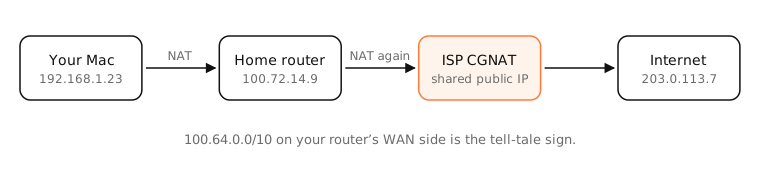
IPv4 addresses ran out years ago. Mobile carriers, fibre providers and many cable ISPs now put customers behind a large NAT in their own network.
How to tell
- Find your router's WAN (internet) address in its admin page.
- Compare it with your public IP from
curl -s https://api.ipify.org. - If they differ, or the WAN address is in 100.64.0.0–100.127.255.255 (reserved for CGNAT by RFC 6598), or in another private range, you're behind CGNAT.
Mobile hotspots are almost always behind CGNAT.
What it breaks
- Port forwarding: you don't control the outer NAT, so incoming connections can't reach you: no hosting game servers, cameras or home VPNs.
- Some games and calls: strict NAT types and relayed connections.
- IP reputation: you share an IP with strangers, so one person's abuse can bring CAPTCHAs or blocks for everyone.
Workarounds
- Use IPv6: if your ISP supports it, devices get real public addresses.
- Ask your ISP for a public or static IPv4 (often free on request, or a paid add-on).
- Use tunnels or mesh VPNs (Tailscale, Cloudflare Tunnel, ZeroTier) that connect outward.
Examples
- Router WAN address 100.72.14.9 and public IP 203.0.113.7: CGNAT.
- Router WAN address 203.0.113.7 matching the public IP: no CGNAT.
- A traceroute whose second hop is a 100.64.x.x address also points to CGNAT.
On a Mac
traceroute -n 1.1.1.1 shows the first hops: your router, then (behind CGNAT) an address in 100.64.0.0/10. Compare curl -s https://api.ipify.org with the WAN IP shown on your router's status page.
See it in the app
LightAtom's connections view shows that incoming connections never arrive behind CGNAT, while outgoing ones work normally.
Frequently asked questions
How do I know if I'm behind CGNAT?
If your router's WAN address differs from your public IP, or starts with 100.64 to 100.127, you're behind carrier-grade NAT.
Is CGNAT bad?
For browsing and streaming it's invisible. It's a problem if you need incoming connections: hosting, port forwarding or some games.
How do I get out of CGNAT?
Ask your ISP for a public IPv4 address, use IPv6, or use a tunnelling service that doesn't need incoming connections.
What is the 100.64.0.0/10 range?
Shared address space reserved for carrier-grade NAT, between ISPs' NAT devices and customer routers.