IPv6 (Internet Protocol version 6) is the successor to IPv4. It uses 128-bit addresses written in hex, like 2001:db8::1, giving an almost unlimited supply so every device can have a global address without NAT. Most phones, Macs and big websites already use it alongside IPv4.
How it works
Writing IPv6 addresses
An address is eight groups of four hex digits, separated by colons. Two shortcuts make them shorter:
- Leading zeros in a group can be dropped:
0db8→db8. - One run of all-zero groups can become
::.
So 2001:0db8:0000:0000:0000:0000:0000:0001 is written 2001:db8::1.
The structure
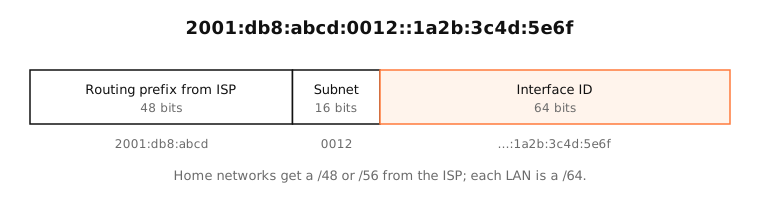
- Routing prefix (often /48 or /56): assigned by your ISP to your connection.
- Subnet ID: your router uses it to number its networks.
- Interface ID (64 bits): identifies the device on that network.
How devices get addresses
Your router announces the network's /64 prefix in router advertisements. Devices then create their own addresses with SLAAC (stateless address autoconfiguration), adding an interface ID they choose. Modern systems choose a stable, random ID per network, plus temporary addresses that change regularly for privacy.
Address types you'll see
fe80::/10link-local: every interface has one; works only on the local link.2000::/3global unicast: public, routable addresses.fc00::/7unique local: private, like 192.168.x.x in IPv4.::1loopback, the IPv6 version of 127.0.0.1.
Examples
A Mac's Wi-Fi interface typically has several IPv6 addresses at once:
inet6 fe80::5f:daca:262:290f%en0 prefixlen 64 secured scopeid 0xe
inet6 2001:db8:452b:8d00:142a:22a:ad2e:19d9 prefixlen 64 autoconf secured
inet6 2001:db8:452b:8d00:dd9c:206e:79c:6f02 prefixlen 64 autoconf temporary
The first is link-local, the second a stable (secured) global address, the third a temporary address used for outgoing connections.
On a Mac
System Settings › Network › Wi-Fi › Details › TCP/IP lists your IPv6 addresses and the IPv6 router. Configure IPv6 is Automatically by default.
In Terminal, ifconfig en0 | grep inet6 lists them, and ping6 -c 3 google.com tests IPv6 connectivity.
See it in the app
In LightAtom's connections view, addresses with colons are IPv6 connections. Many Apple, Google and Cloudflare services use IPv6 when your network supports it.
Frequently asked questions
What is IPv6 used for?
The same thing as IPv4: addressing and routing data between devices on the internet. It replaces IPv4's limited address space so every device can have a public address.
Is IPv6 enabled on my Mac?
By default, yes: macOS configures IPv6 automatically. Whether it works depends on your router and ISP. The IPv6 test above checks it.
Why does IPv6 have so many addresses per device?
Each interface has a link-local address, a stable global address and one or more temporary privacy addresses. Old temporary addresses are kept as deprecated until their connections end.
Should I turn off IPv6?
Usually not. Only disable it to work around a network where IPv6 is broken, and turn it back on afterwards.