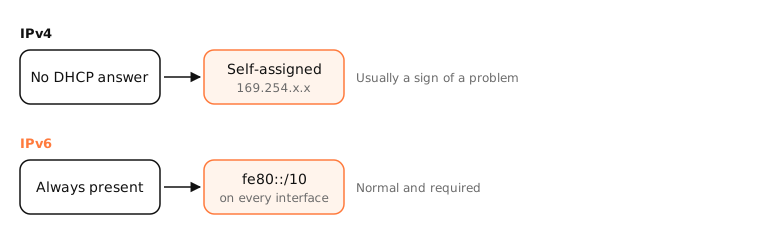
A link-local address is valid only on the directly connected network and is never routed. IPv4 link-local addresses (169.254.0.0/16) are self-assigned when DHCP fails. IPv6 link-local addresses (fe80::/10) exist on every interface and are used for neighbour discovery and routing.
How it works
IPv4: 169.254.x.x
If your Mac asks for an address and no DHCP server answers, it picks a random address in 169.254.0.0/16 and checks with ARP that nobody else has it. macOS calls this a self-assigned IP address. Devices can still talk to each other directly on that segment (handy for a direct cable between two Macs), but there's no router, so no internet.
Common causes: router DHCP down or out of addresses, Wi-Fi not fully authenticated, a firewall or VPN interfering, or a bad cable.
IPv6: fe80::
Every IPv6 interface automatically has a fe80:: address, alongside any global ones. It's used for Neighbor Discovery, router advertisements and talking to the router. Seeing one is completely normal.
Because every interface has fe80:: addresses, you must say which one: fe80::1%en0 (the %en0 is the zone index).
Examples
$ ifconfig en0 | grep inet
inet6 fe80::1c2a:5bff:fe3d:9a10%en0 prefixlen 64 secured scopeid 0xe
inet 192.168.1.23 netmask 0xffffff00 broadcast 192.168.1.255
Healthy: a normal IPv4 address plus an IPv6 link-local. A 169.254.x.x inet line instead would mean DHCP failed.
On a Mac
System Settings › Network shows “Self-assigned IP” in yellow when you have a 169.254 address. sudo ipconfig set en0 DHCP asks for a new lease; ping6 fe80::1%en0 pings a router's link-local address.
See it in the app
LightAtom's connections view shows link-local traffic such as AirDrop and other peer-to-peer connections on the local segment.
Frequently asked questions
What does a 169.254 address mean?
Your device couldn't get an address from DHCP and assigned itself one. It can't reach the internet until DHCP works.
Is an fe80 address a problem?
No. Every IPv6-enabled interface has one; it's required for IPv6 to work on the local network.
Can link-local addresses reach the internet?
No. Routers never forward link-local traffic beyond the local segment.
Why does my Mac have a self-assigned IP?
The router didn't answer its DHCP request. Restart the router, renew the lease, or check Wi-Fi security and cables.