Bonjour is Apple's zero-configuration networking. Devices announce and discover services, like printers, AirPlay and file sharing, on the local network using multicast DNS (mDNS) on 224.0.0.251, port 5353, and get names ending in .local, with no DNS server needed.
How it works
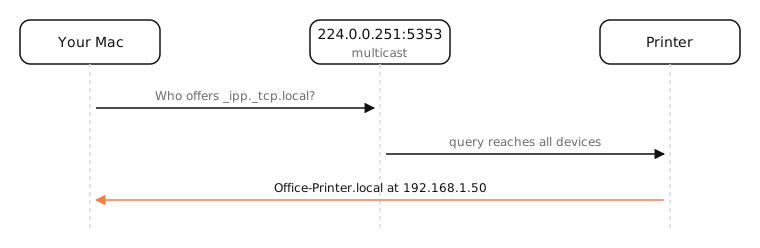
Bonjour combines three things:
- Link-local addressing: devices get an address even without DHCP (169.254.x.x or fe80::).
- Multicast DNS (mDNS): instead of asking a DNS server, a device asks everyone on the network, “who is
office-printer.local?”, and the owner answers. - DNS-based service discovery (DNS-SD): devices advertise services by type, such as
_ipp._tcp(printing),_airplay._tcp,_smb._tcp(file sharing) or_ssh._tcp.
On a Mac, the mDNSResponder process handles all of it, as well as ordinary DNS.
Limits
mDNS uses multicast, which doesn't cross routers. Devices on a guest network, another VLAN or a mesh system with client isolation often can't see each other, the classic “AirPlay doesn't find my TV” problem. Some routers offer an mDNS reflector to bridge networks.
The same standards are used by Windows, Linux (Avahi), Chromecast and most printers.
Examples
$ dns-sd -B _ipp._tcp local.
Browsing for _ipp._tcp.local.
Timestamp     A/R  Flags  if Domain  Service Type  Instance Name
10:42:01.112  Add  2      14 local.  _ipp._tcp.    Office Printer
Every Mac also has a Bonjour name: ssh my-macbook.local connects to another Mac on the same network by name.
On a Mac
- Your Mac's .local name is set in System Settings › General › Sharing (Local hostname).
dns-sd -B _services._dns-sd._udp local.lists every service type advertised on your network.dns-sd -G v4 my-macbook.localresolves a .local name.
See it in the app
LightAtom's connections view shows mDNSResponder's multicast UDP traffic, Bonjour included, as one row.
Frequently asked questions
What is Bonjour on a Mac?
Apple's built-in zero-configuration networking that lets devices find each other and their services on a local network automatically.
Can I disable Bonjour?
Not without breaking AirPlay, AirDrop discovery, printing and file sharing. mDNSResponder also handles normal DNS, so it must keep running.
What port does Bonjour use?
UDP port 5353, sent to the multicast address 224.0.0.251 (or ff02::fb for IPv6).
Why can't my Mac see a device on the same Wi-Fi?
The device may be on a guest network or a separate band or VLAN, or the router may isolate clients. Multicast must reach both devices.