DHCP (Dynamic Host Configuration Protocol) automatically assigns devices an IP address, subnet mask, default gateway and DNS servers when they join a network. The address is leased for a set time and renewed while the device stays connected. Your router is usually the DHCP server.
How it works
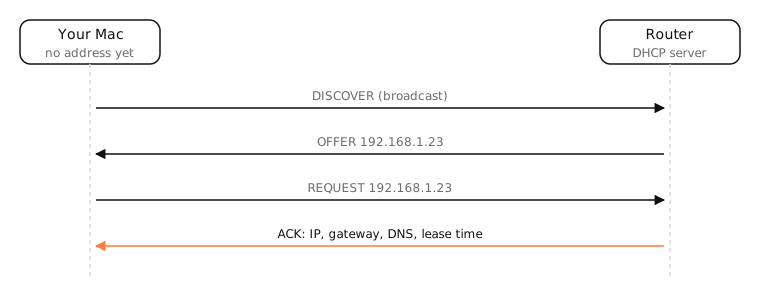
DORA: four messages
- Discover: the device broadcasts “is there a DHCP server?” (it has no address yet).
- Offer: the server offers a free address and settings.
- Request: the device asks for that address.
- Acknowledge: the server confirms, with the lease time.
DHCP uses UDP ports 67 (server) and 68 (client).
Leases
Addresses are borrowed, typically for hours to a day. At half the lease time the device asks to renew; if the server is gone, it keeps trying until the lease expires. Rejoining a known network, the Mac asks for its previous address, so IPs tend to stay the same.
Reservations
A router can always give the same device the same IP, matched by MAC address. That's the easiest way to make a printer or NAS “static”. Note that private Wi-Fi addresses on Apple devices change the MAC per network, and can rotate.
When DHCP fails
No answer means no address: macOS falls back to a self-assigned 169.254.x.x address and you can't get online. Two DHCP servers on one network (say, a second router) cause random wrong addresses.
Examples
$ ipconfig getpacket en0 | grep -E 'yiaddr|subnet_mask|router|lease_time'
yiaddr = 192.168.1.23
subnet_mask (ip): 255.255.255.0
router (ip_mult): {192.168.1.1}
lease_time (uint32): 0xe10
0xe10 is 3,600 seconds: a one-hour lease.
On a Mac
- System Settings › Network › Wi-Fi › Details › TCP/IP › Renew DHCP Lease asks for a fresh lease.
sudo ipconfig set en0 DHCPdoes the same in Terminal;ipconfig getpacket en0shows the current lease.
See it in the app
After a DHCP renewal on a new network, LightAtom's connections view shows your apps reconnecting.
Frequently asked questions
What does DHCP do?
It automatically configures devices with an IP address, subnet mask, router and DNS servers so they can use the network.
Should DHCP be on or off on my router?
On, unless another device on the network is already the DHCP server. Exactly one should be active.
What port does DHCP use?
UDP 67 for the server and UDP 68 for the client.
What happens if DHCP fails?
The device gets no address, or self-assigns a 169.254.x.x link-local address, and can't reach the internet.