DHCP and DNS do different jobs. DHCP runs when your device joins a network and gives it an IP address, subnet mask, router and DNS server. DNS runs every time an app needs to turn a name like apple.com into an IP address.
How it works
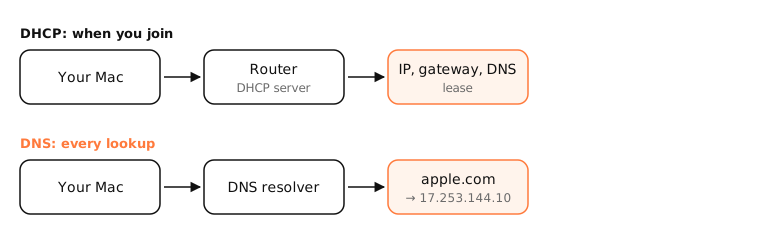
DHCP: configuration
When your Mac joins Wi-Fi it broadcasts a DHCP request. The router replies with a lease: an IP address, subnet mask, default gateway, DNS server addresses and a lease time. This happens once per join and on lease renewals.
DNS: name resolution
Whenever an app connects to a name, the system asks the DNS server (the one DHCP provided, unless you set your own) for its address. This happens constantly, hundreds of times an hour.
How they connect
- DHCP tells your device which DNS server to use.
- On many home routers, the same box is DHCP server and DNS forwarder.
- Some routers register DHCP clients' names in local DNS, so
nas.lanresolves.
Diagnosing
- No IP or a 169.254 address: a DHCP problem.
- An IP, but names don't resolve (“server not found”) while
ping 1.1.1.1works: a DNS problem.
Side by side
| DHCP | DNS | |
|---|---|---|
| Job | Configures devices | Resolves names |
| When | Joining and renewing | Every lookup |
| Ports | UDP 67/68 | UDP/TCP 53 (or 443, 853) |
| Server | Usually your router | Router, ISP or public resolver |
| Failure looks like | No IP, 169.254.x.x | Sites not found, IP works |
Examples
$ ipconfig getpacket en0 | grep -E 'yiaddr|router|domain_name_server|lease'
yiaddr = 192.168.1.23
lease_time (uint32): 0x15180
router (ip_mult): {192.168.1.1}
domain_name_server (ip_mult): {192.168.1.1}
The DHCP lease (one day, 0x15180 seconds) made the router the Mac's DNS server.
On a Mac
ipconfig getpacket en0 shows what DHCP gave you; scutil --dns shows which DNS servers are in use. Override DNS while keeping DHCP in System Settings › Network › Details › DNS.
See it in the app
LightAtom's connections view labels your apps' connections with the names they looked up after DHCP has set your Mac up.
Frequently asked questions
What is the difference between DNS and DHCP?
DHCP assigns your device its IP address and network settings; DNS translates domain names into IP addresses.
Does DHCP assign DNS servers?
Yes. A DHCP lease includes the DNS servers your device should use, unless you override them.
Can a router be both DHCP and DNS server?
Yes, most home routers are both, forwarding DNS queries to the ISP or a configured resolver.
Is it a DNS or DHCP problem?
If you have no valid IP address, it's DHCP. If you have one but names won't resolve, it's DNS.