A subnet mask is a 32-bit number, like 255.255.255.0, that marks which part of an IP address identifies the network and which part identifies the device. Your computer uses it to decide whether a destination is on the local network or must go through the router.
How it works
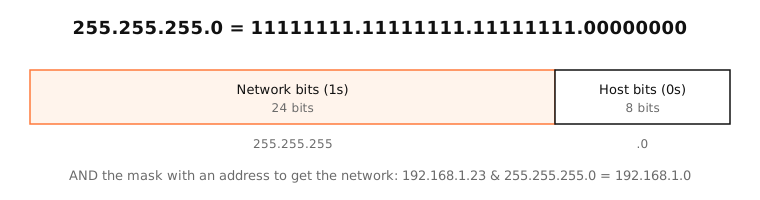
In binary, a subnet mask is always a run of ones followed by zeros. The ones cover the network part of the address; the zeros cover the host part.
To find the network an address belongs to, the computer does a bitwise AND of the address and the mask:
192.168.1.23    11000000.10101000.00000001.00010111
255.255.255.0   11111111.11111111.11111111.00000000
network         11000000.10101000.00000001.00000000  = 192.168.1.0
If the destination gives the same result, it's on the same subnet and the computer sends to it directly. Otherwise it sends to the default gateway.
Common masks
Each mask has a CIDR equivalent: count the ones. 255.255.255.0 has 24 ones, so it's /24. Only certain values appear in each octet, because the ones must be contiguous: 0, 128, 192, 224, 240, 248, 252, 254 and 255.
255.255.255.0
This is the mask on almost every home network: the first three numbers of the address identify the network, the last one the device. It allows 254 devices (.1 to .254); .0 is the network address and .255 the broadcast address.
Side by side
| Mask | CIDR | Hosts | Last octet values |
|---|---|---|---|
| 255.255.255.0 | /24 | 254 | one block of 256 |
| 255.255.255.128 | /25 | 126 | blocks of 128 |
| 255.255.255.192 | /26 | 62 | blocks of 64 |
| 255.255.255.240 | /28 | 14 | blocks of 16 |
| 255.255.0.0 | /16 | 65,534 | third and fourth octets vary |
Examples
- 192.168.1.23 / 255.255.255.0: network 192.168.1.0, devices .1 to .254.
- 10.0.5.40 / 255.255.252.0 (/22): network 10.0.4.0, range 10.0.4.1 to 10.0.7.254.
- A Mac at 192.168.1.23/24 talks to 192.168.1.50 directly, but sends traffic for 192.168.2.10 to the router.
On a Mac
System Settings › Network › Wi-Fi › Details › TCP/IP shows the Subnet Mask. In Terminal, ifconfig en0 shows it in hex as netmask 0xffffff00 (ff = 255, 00 = 0), and ipconfig getpacket en0 shows the mask the DHCP server assigned.
A wrong manual mask is a classic cause of “I can reach some devices but not others”.
Try it
Try: , ,
- Network address
- 192.168.1.0
- Broadcast address
- 192.168.1.255
- Usable host range
- 192.168.1.1 – 192.168.1.254
- Usable hosts
- 254
- Total addresses
- 256
- Subnet mask
- 255.255.255.0
- Wildcard mask
- 0.0.0.255
- CIDR notation
- 192.168.1.0/24
- Binary mask
- 11111111.11111111.11111111.00000000
- IP class
- C
- Type
- Private (RFC 1918)
See it in the app
LightAtom's Map counts connections to devices on your subnet (printers, AirPlay, other Macs) separately, under Local network.
Frequently asked questions
What does 255.255.255.0 mean?
It's the subnet mask for a /24: the first three octets of an address are the network, the last octet is the device. It allows 254 devices on the network.
How do I find my subnet mask on a Mac?
System Settings › Network › Wi-Fi (or Ethernet) › Details › TCP/IP shows it, usually 255.255.255.0.
What is the difference between a subnet mask and a default gateway?
The mask defines which addresses are local. The default gateway is the router your device sends everything else to.
Can a subnet mask be 255.255.255.255?
Yes, as /32: a network of one address, used for host routes and firewall rules, not for normal LANs.