A subnet (subnetwork) is a block of IP addresses that forms one network, such as 192.168.1.0 to 192.168.1.255. Devices in the same subnet talk directly; traffic between subnets goes through a router. The subnet mask or prefix (/24) defines where a subnet starts and ends.
How it works
Every IPv4 address is 32 bits long. A subnet splits those bits into two parts:
- the network part, which is the same for every device in the subnet;
- the host part, which is different for each device.
The subnet mask says where the split is. 255.255.255.0 means the first 24 bits are the network and the last 8 bits are for hosts. The same thing in CIDR notation is /24.
When your Mac wants to send a packet, it compares the destination with its own address using the mask. If the network parts match, the destination is on the same subnet, so the Mac sends the packet directly (finding the device's hardware address with ARP). If they don't match, the packet goes to the default gateway, your router, which forwards it on.
Why split networks into subnets?
- Less noise: broadcasts reach only one subnet, not the whole network.
- Security: a firewall or router between subnets can control what crosses. Guest Wi-Fi is a separate subnet for that reason.
- Organisation: offices give each floor, team or device type (phones, cameras, servers) its own subnet.
- Address planning: ISPs and cloud providers hand out address space in subnet-sized blocks.
How big is a subnet?
The number of host bits sets the size: a subnet with h host bits has 2^h addresses. Two are reserved, the first (network address) and the last (broadcast address), so a /24 has 256 addresses and 254 usable hosts, and a /26 has 64 addresses and 62 hosts.
Side by side
| Prefix | Subnet mask | Addresses | Usable hosts | Typical use |
|---|---|---|---|---|
| /24 | 255.255.255.0 | 256 | 254 | A home or small office network |
| /25 | 255.255.255.128 | 128 | 126 | Half a /24 |
| /26 | 255.255.255.192 | 64 | 62 | A team or device VLAN |
| /27 | 255.255.255.224 | 32 | 30 | A small segment |
| /30 | 255.255.255.252 | 4 | 2 | A link between two routers |
Examples
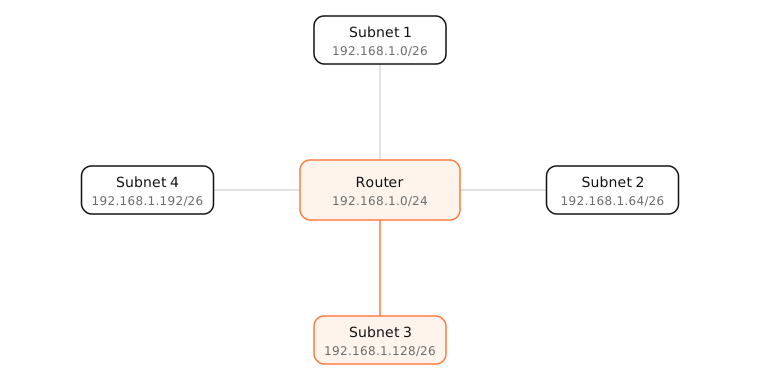
Split 192.168.1.0/24 into four equal subnets by borrowing 2 host bits, which makes each one a /26:
| Subnet | Usable hosts | Broadcast |
|---|---|---|
| 192.168.1.0/26 | .1 – .62 | .63 |
| 192.168.1.64/26 | .65 – .126 | .127 |
| 192.168.1.128/26 | .129 – .190 | .191 |
| 192.168.1.192/26 | .193 – .254 | .255 |
A device at 192.168.1.70 is in the second subnet. It can reach 192.168.1.100 directly, but 192.168.1.140 is in a different subnet, so that traffic goes through the router.
On a Mac
Open System Settings › Network › Wi-Fi › Details › TCP/IP. You'll see your IP address, the Subnet Mask (usually 255.255.255.0) and the Router. Together they define your subnet.
In Terminal, ifconfig en0 | grep "inet " shows the mask in hex: netmask 0xffffff00 is 255.255.255.0, a /24. ipconfig getpacket en0 shows the mask and router the DHCP server handed out.
Try it
Try: , ,
- Network address
- 192.168.1.0
- Broadcast address
- 192.168.1.255
- Usable host range
- 192.168.1.1 – 192.168.1.254
- Usable hosts
- 254
- Total addresses
- 256
- Subnet mask
- 255.255.255.0
- Wildcard mask
- 0.0.0.255
- CIDR notation
- 192.168.1.0/24
- Binary mask
- 11111111.11111111.11111111.00000000
- IP class
- C
- Type
- Private (RFC 1918)
See it in the app
LightAtom's Map lists connections that stay on your local subnet, such as AirPlay, printers and other Macs, separately from those that leave through the router.
Frequently asked questions
What is a subnet in simple terms?
A subnet is a group of IP addresses that form one network, like all addresses from 192.168.1.0 to 192.168.1.255. Devices in the same subnet talk directly; to reach other subnets they go through a router.
What is the difference between a subnet and a subnet mask?
The subnet is the range of addresses. The subnet mask (like 255.255.255.0) is the pattern that defines that range, by marking which bits of an address are the network part.
What subnet am I on?
Take your IP address and subnet mask from System Settings › Network › Details › TCP/IP and enter them in the subnet calculator. With 192.168.1.23 and 255.255.255.0, you're on 192.168.1.0/24.
Why are two addresses lost in every subnet?
The first address identifies the network itself and the last is the broadcast address. Neither can be given to a device, except in /31 and /32 networks.
Is subnetting still used?
Yes. Home routers create a subnet, offices split networks into VLANs, and cloud providers like AWS make you choose subnets for every virtual network.