A default gateway is the router your device sends packets to when the destination isn't on its own subnet. On a home network it's your router, usually at an address like 192.168.1.1 or 10.0.0.1. Without a gateway, a device can only reach devices on the same local network.
How it works
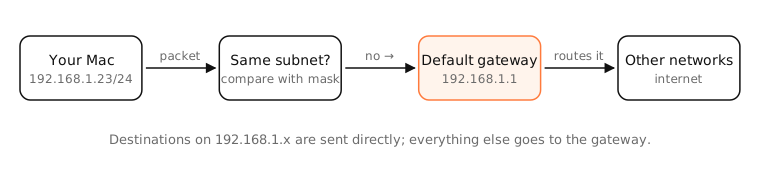
For every packet, your Mac checks the destination against its own address and subnet mask:
- Same subnet: deliver directly, using ARP to find the device's MAC address.
- Different network: send it to the default gateway, which forwards it towards the destination.
The gateway appears in the routing table as the default route (0.0.0.0/0, or default on macOS): the route used when no more specific one matches.
DHCP gives your device the gateway address along with its IP and mask. With a manual configuration, a missing or wrong gateway is a classic cause of “I can reach the printer but not the internet”.
“Gateway” in other contexts
The word also means other things: an ISP's modem-router combo is sold as a “gateway”, and in software an “API gateway” is a server that routes API requests. The default gateway is specifically the IP routing concept above.
Examples
netstat -rn -f inet on a Mac:
Destination        Gateway            Flags   Netif
default            192.168.1.1        UGScg   en0
192.168.1/24       link#14            UCS     en0
The default line says: send everything else to 192.168.1.1 via en0. The 192.168.1/24 line says the local subnet is reached directly.
On a Mac
- System Settings › Network › Wi-Fi › Details › TCP/IP: the Router field is your default gateway.
- Terminal:
route -n get default | grep gateway, ornetstat -rn | grep default. - Test it:
ping -c 3 192.168.1.1(use your gateway's address). No reply usually means a Wi-Fi or cable problem between you and the router.
See it in the app
LightAtom's Map shows which connections stay local and which go out to the internet.
Frequently asked questions
How do I find my default gateway on a Mac?
System Settings › Network › Wi-Fi › Details › TCP/IP shows it as Router. In Terminal, run route -n get default.
Is the default gateway the same as my router?
On a home network, yes: your router is the default gateway. In bigger networks it's whichever router connects your subnet to the rest.
What happens if the default gateway is wrong?
You can still reach devices on your local subnet, but nothing beyond it: no internet.
What does “default gateway is not available” mean?
A Windows message meaning the PC can't reach its router, usually because the connection dropped or the adapter went to sleep.