CIDR notation describes an IP network as an address followed by a slash and a number, like 10.0.0.0/8. The number is the prefix length: how many leading bits identify the network. A /24 has 24 network bits and 8 host bits, which is 256 addresses.
How it works
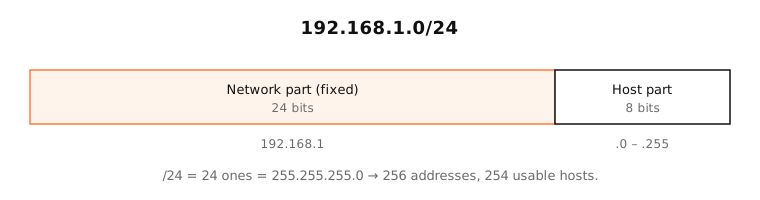
CIDR (Classless Inter-Domain Routing) replaced the old fixed classes A, B and C in 1993. Instead of networks being exactly /8, /16 or /24, any length from /0 to /32 is allowed.
Reading a prefix
- The prefix length is the number of 1 bits in the subnet mask. /24 → 24 ones → 255.255.255.0.
- The size is 2^(32 − prefix) addresses. /24 → 2^8 = 256; /20 → 2^12 = 4,096.
- The address is the first address in the block (the network address).
Each step down in prefix length doubles the size: /23 is twice a /24, /22 twice a /23.
Aggregation
CIDR lets routers summarise. Four networks 10.0.0.0/24, 10.0.1.0/24, 10.0.2.0/24 and 10.0.3.0/24 can be announced as one route: 10.0.0.0/22. This kept internet routing tables manageable as the network grew.
IPv6
CIDR works the same way for IPv6, just with 128 bits: 2001:db8::/32 is a block where the first 32 bits are fixed.
Side by side
| CIDR | Subnet mask | Addresses | Old class |
|---|---|---|---|
| /8 | 255.0.0.0 | 16,777,216 | Class A |
| /16 | 255.255.0.0 | 65,536 | Class B |
| /24 | 255.255.255.0 | 256 | Class C |
| /28 | 255.255.255.240 | 16 | — |
| /32 | 255.255.255.255 | 1 | — |
Examples
- 192.168.1.0/24: 192.168.1.0 to 192.168.1.255, your typical home network.
- 10.0.0.0/8: 10.0.0.0 to 10.255.255.255, the largest private range.
- 203.0.113.5/32: exactly one address, as used in a firewall rule.
- 0.0.0.0/0: every IPv4 address, the default route.
Try any of them in the calculator below to see the range.
On a Mac
macOS shows the mask in two forms: System Settings › Network › Details › TCP/IP shows 255.255.255.0, and ifconfig shows netmask 0xffffff00 (hex). Both are /24. In the routing table (netstat -rn), local networks appear in CIDR-like form, such as 192.168.1/24.
Try it
Try: , ,
- CIDR block
- 10.0.0.0/22
- IP range
- 10.0.0.0 – 10.0.3.255
- Addresses
- 1,024
- Usable hosts
- 1,022
- Subnet mask
- 255.255.252.0
- Wildcard mask
- 0.0.3.255
See it in the app
LightAtom's Map counts addresses on your local subnet separately from the internet: the same check your Mac does with the prefix length.
Frequently asked questions
What does /24 mean in an IP address?
The first 24 bits of the address are the network part. That's a subnet mask of 255.255.255.0 and 256 addresses, of which 254 can be used by devices.
How do I convert a subnet mask to CIDR?
Count the 1 bits. 255.255.255.0 has 24, so /24; 255.255.240.0 has 20, so /20. The CIDR calculator converts both ways.
What is the difference between CIDR and subnetting?
Subnetting is dividing a network into smaller ones; CIDR is the notation and routing system that allows prefixes of any length. You use CIDR notation to write subnets.
What does 0.0.0.0/0 mean?
All IPv4 addresses. In routing it's the default route; in firewall rules it means “anywhere”.