A dynamic IP address is assigned automatically by DHCP for a limited time and can change. A static IP address is fixed, set by hand or reserved on the router. This applies at two levels: your devices' private IPs at home, and the public IP your ISP gives you.
How it works
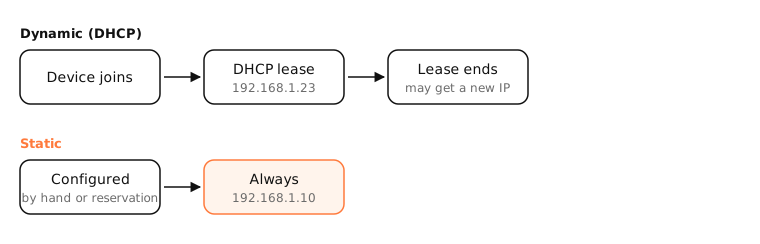
On your home network
Your router's DHCP server leases addresses to devices. Leases are renewed, so a device usually keeps its IP, but not always: after a long absence or a router restart it can change.
Give a device a fixed address when other devices need to find it by IP: printers, NAS drives, home servers, port-forwarding targets. The best way is a DHCP reservation on the router (it always hands that device the same IP). Setting a static IP on the device itself works too; pick one outside the router's DHCP range to avoid conflicts.
From your ISP
Most home connections get a dynamic public IP. A static public IP is usually a paid add-on, useful for hosting servers, VPN endpoints and firewall allow-lists. Dynamic DNS is a free alternative for reaching home by name.
Side by side
| Dynamic | Static | |
|---|---|---|
| Assigned by | DHCP, automatically | You or a reservation |
| Changes | Can change | Never |
| Setup | None | Manual |
| Conflicts | Rare | Possible if misconfigured |
| Best for | Laptops, phones, most devices | Servers, printers, NAS |
| Public IP from ISP | Default, free | Often paid |
Examples
- Your iPhone's IP at home changes from 192.168.1.24 to 192.168.1.31 after a router restart: dynamic.
- A NAS reserved at 192.168.1.10 on the router keeps that address forever: static by reservation.
On a Mac
System Settings › Network › Wi-Fi or Ethernet › Details › TCP/IP: set Configure IPv4 to Manually to enter a static IP, mask and router, or Using DHCP with manual address to keep DHCP for everything else. ipconfig getpacket en0 shows your current DHCP lease.
See it in the app
LightAtom's connections view shows the local addresses of devices your Mac talks to, so you can confirm a NAS or printer kept its IP.
Frequently asked questions
Is my IP address static or dynamic?
At home it's almost certainly dynamic, both on your devices and from your ISP, unless you've set it or paid for a static IP.
Is a static IP faster?
No. Speed is the same; a static IP only stays the same.
Should I use a static IP?
For devices others connect to by IP, like a printer or server. Use a DHCP reservation on the router where possible.
Does a dynamic IP make me more private?
Slightly, as it can change over time, but trackers rely far more on cookies and fingerprints than on your IP.