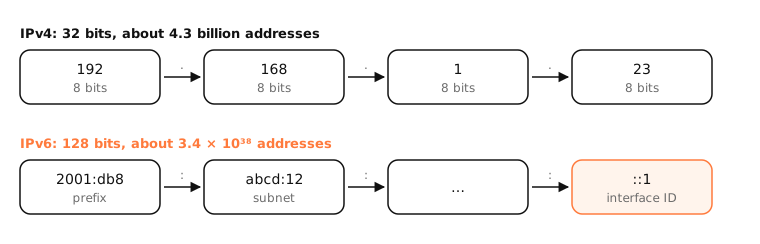
IPv4 and IPv6 are the two versions of the Internet Protocol. IPv4 uses 32-bit addresses like 192.168.1.23, about 4.3 billion in total. IPv6 uses 128-bit addresses like 2001:db8::1, enough for every device to have its own global address.
How it works
Why IPv6 exists
IPv4's 4.3 billion addresses ran out: the regional registries handed out their last free blocks in the 2010s. Networks coped with NAT, which lets many private addresses share one public address, but NAT complicates direct connections, gaming, calls and hosting. IPv6, standardized in the late 1990s, fixes the shortage with 2¹²⁸ addresses.
What actually changes
- Addresses: IPv6 addresses are written in hex, in eight groups, with
::for runs of zeros. - No NAT needed: each device gets globally routable addresses; your router's firewall still blocks unsolicited inbound traffic.
- Autoconfiguration: devices build their own addresses from the network's prefix (SLAAC), often without DHCP.
- Privacy addresses: devices use temporary, rotating addresses for outgoing connections.
- No broadcast: IPv6 uses multicast instead.
Dual stack
Most networks run both. When a site has both IPv4 (A record) and IPv6 (AAAA record) addresses, your browser tries both at almost the same time and uses whichever connects first, an algorithm called Happy Eyeballs, usually preferring IPv6.
Side by side
| IPv4 | IPv6 | |
|---|---|---|
| Address length | 32 bits | 128 bits |
| Example | 192.168.1.23 | 2001:db8:abcd:12::1 |
| Number of addresses | about 4.3 billion | about 3.4 × 10³⁸ |
| NAT | Almost always | Not needed |
| Address setup | DHCP or manual | SLAAC, DHCPv6 or manual |
| DNS record | A | AAAA |
| Loopback | 127.0.0.1 | ::1 |
Examples
The same Mac, on the same Wi-Fi, has both kinds of address:
inet 192.168.1.23 netmask 0xffffff00 broadcast 192.168.1.255
inet6 fe80::5f:daca:262:290f%en0 prefixlen 64 secured scopeid 0xe
inet6 2001:db8:452b:8d00:dd9c:206e:79c:6f02 prefixlen 64 autoconf temporary
apple.com publishes both: dig +short apple.com A returns 17.253.144.10, and dig +short apple.com AAAA returns an IPv6 address. curl -v shows which one it actually used.
On a Mac
System Settings › Network › Wi-Fi › Details › TCP/IP shows both your IPv4 address and your IPv6 addresses, with Configure IPv6 usually set to Automatically.
To see which protocol a connection uses, run curl -v https://example.com -o /dev/null and look at the “Connected to” line, or force one with curl -4 or curl -6.
See it in the app
LightAtom's connections view shows each connection's remote address, so you can see which apps and servers use IPv6 (addresses with colons) and which IPv4.
Frequently asked questions
Is IPv6 faster than IPv4?
Sometimes slightly, because traffic can avoid carrier-grade NAT and some ISPs route IPv6 more directly. For most people the difference isn't noticeable.
Do I need IPv6?
Almost everything still works over IPv4. IPv6 helps when your ISP uses CGNAT for IPv4, for gaming and hosting, and as more networks become IPv6-first.
Can IPv4 and IPv6 talk to each other?
Not directly. Devices use both stacks side by side (dual stack), and some networks translate between them (NAT64).
Why does my IPv6 address keep changing?
macOS uses temporary privacy addresses that rotate regularly for outgoing connections. That's normal and intended.