SSH (Secure Shell) is a protocol for logging in to another computer and running commands over an encrypted connection, usually on TCP port 22. It also carries file transfers (scp, SFTP), Git operations and encrypted tunnels. It replaced insecure tools like telnet and rlogin.
How it works
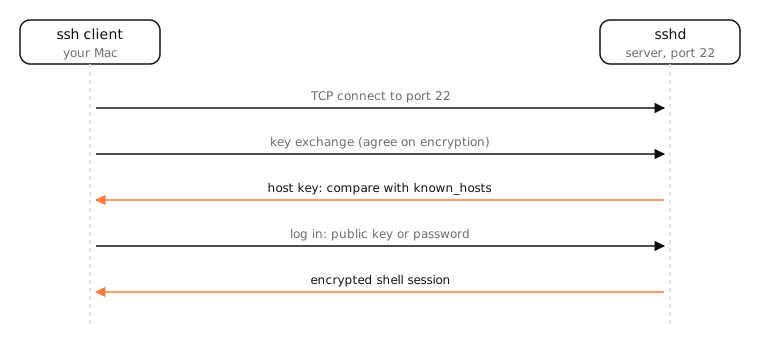
- Connect: the client opens a TCP connection to the server, usually port 22.
- Key exchange: both sides agree on encryption keys (for example with curve25519), so everything after is encrypted.
- Host verification: the server proves its identity with its host key. The first time, your client asks you to accept the fingerprint and stores it in
~/.ssh/known_hosts. If it ever changes unexpectedly, ssh warns loudly, protecting you from impostor servers. - Authentication: you log in with a public key (the server checks your public key is in
~/.ssh/authorized_keysand you prove you hold the private key) or a password. - Session: a shell, a file transfer, or forwarded ports, all multiplexed over the one encrypted connection.
Keys vs passwords
Keys are far stronger than passwords and can't be guessed by bots hammering port 22. Keep the private key on your Mac with a passphrase; put the public key on servers.
Examples
ssh jane@server.example.comopens a shell.scp file.zip jane@server:~/copies a file.git clone git@github.com:org/repo.gituses SSH to talk to GitHub.ssh -L 5433:localhost:5432 serverforwards a local port to the server's database.
On a Mac
macOS includes OpenSSH. Run ssh in Terminal to connect out. To let others SSH into your Mac, turn on Remote Login in System Settings › General › Sharing and limit it to specific users. Keys live in ~/.ssh; ssh-add --apple-use-keychain stores the key's passphrase in your keychain.
See it in the app
LightAtom's connections view shows each SSH session from your Mac with its traffic, and its Ports view whether Remote Login is listening on port 22.
Frequently asked questions
What is SSH used for?
Logging in to servers and other computers securely, transferring files (scp, SFTP), working with Git hosts, and creating encrypted tunnels.
What port does SSH use?
TCP port 22 by default. Servers can be configured to use another port, which you then pass with ssh -p.
Is SSH secure?
Yes, when keys are used and host keys are verified. Weak passwords on internet-facing servers are the usual weak point.
What is the difference between SSH and SSL/TLS?
Both encrypt connections, but they're different protocols. TLS secures HTTPS and many app protocols; SSH is its own protocol for remote login, file transfer and tunnelling.