FTP (File Transfer Protocol) moves files between a client and a server. It sends commands on TCP port 21 and file data over a second connection. FTP sends usernames, passwords and files unencrypted, so secure alternatives like SFTP (over SSH) and FTPS (FTP over TLS) are preferred.
How it works
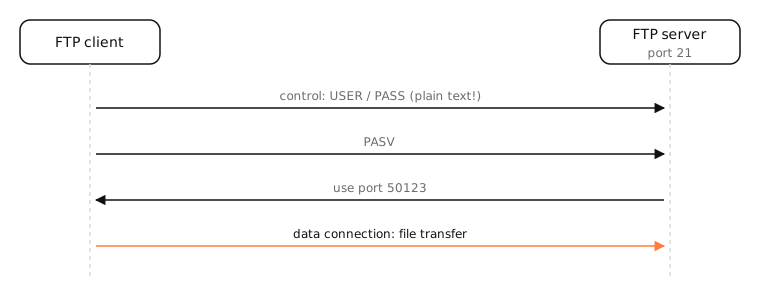
FTP dates from 1971 and uses two connections:
- Control connection on port 21: commands like USER, PASS, LIST and RETR, and their replies.
- Data connection: the file contents and directory listings.
In active mode, the server connects back to the client for data (from port 20), which firewalls and NAT usually block. In passive mode, the client opens the data connection to a port the server announces, which works behind NAT and is the default today.
FTP vs SFTP vs FTPS
| FTP | FTPS | SFTP | |
|---|---|---|---|
| Encryption | None | TLS | SSH |
| Port | 21 (+ data ports) | 21 or 990 (+ data ports) | 22 |
| Firewall-friendly | No | No | Yes, one connection |
Despite the similar name, SFTP is a completely different protocol that runs inside SSH.
Examples
- Uploading a website to an old shared host over FTP.
- Scanners and printers that save scans to an FTP folder.
- Public software mirrors that historically offered anonymous FTP (most now use HTTPS).
On a Mac
macOS no longer includes an FTP server or the ftp command. Finder can mount an FTP server read-only (Go › Connect to Server, ftp://host). For uploads, use an app such as Cyberduck or Transmit, or prefer SFTP: sftp user@host and scp are built in.
See it in the app
LightAtom's connections view shows FTP transfers as a connection to port 21 plus separate data connections, and SFTP as a single connection to port 22.
Frequently asked questions
Is FTP still used?
In some places: legacy web hosting, scanners, industrial and data-feed systems. For anything new, SFTP or HTTPS uploads are better.
Is FTP secure?
No. Passwords and files travel unencrypted. Use SFTP or FTPS instead.
What is the difference between SFTP and FTP?
SFTP runs over SSH on one encrypted connection (port 22). FTP is unencrypted and uses separate control and data connections. They're different protocols.
Can a Mac connect to an FTP server?
Finder can read FTP servers via Go › Connect to Server. For uploads, use Cyberduck, Transmit or another FTP client.