The OSI (Open Systems Interconnection) model is a seven-layer framework describing how network communication works: physical, data link, network, transport, session, presentation and application. Each layer serves the one above it. The internet actually uses the simpler TCP/IP model, but OSI layer numbers are used everywhere.
How it works
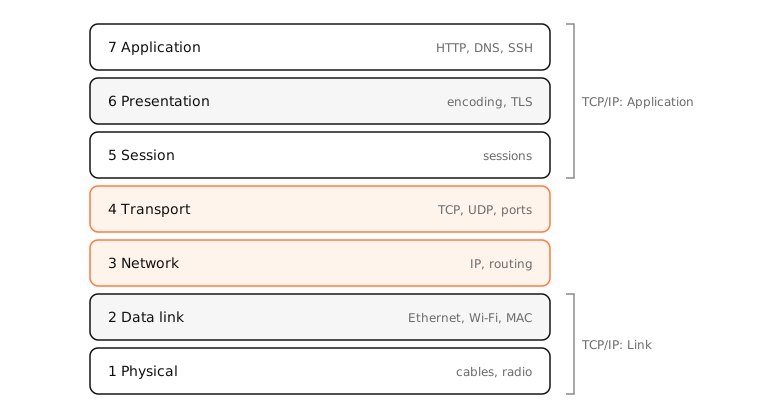
The seven layers, bottom to top
- Physical: signals on cables, fibre and radio. Ethernet cables, Wi-Fi radios.
- Data link: frames between devices on the same network, addressed by MAC. Ethernet, Wi-Fi (802.11), switches, ARP.
- Network: packets across networks, addressed by IP. IPv4, IPv6, ICMP, routers.
- Transport: end-to-end delivery between programs, by port. TCP, UDP, QUIC.
- Session: managing a conversation's lifetime.
- Presentation: encoding, compression, encryption. TLS is often placed here.
- Application: what apps speak. HTTP, DNS, SSH, SMTP.
Mnemonic
From layer 1 up: Please Do Not Throw Sausage Pizza Away.
Why it's still useful
It's a shared vocabulary: “a layer 2 problem” means switching or Wi-Fi association, “layer 7 load balancer” means one that understands HTTP. Troubleshooting bottom-up (cable, Wi-Fi, IP, ports, app) is a reliable habit.
OSI vs TCP/IP
The TCP/IP model merges layers 5–7 into Application and layers 1–2 into Link, giving four layers. Real protocols map more neatly onto TCP/IP.
Side by side
| # | OSI layer | Unit | Examples |
|---|---|---|---|
| 7 | Application | Data | HTTP, DNS, SSH |
| 6 | Presentation | Data | TLS, JPEG, UTF-8 |
| 5 | Session | Data | Sessions, RPC |
| 4 | Transport | Segment / datagram | TCP, UDP, QUIC |
| 3 | Network | Packet | IP, ICMP |
| 2 | Data link | Frame | Ethernet, Wi-Fi, ARP |
| 1 | Physical | Bits | Cables, radio |
Examples
Troubleshooting a site that won't load, layer by layer on a Mac:
- Wi-Fi connected? (layers 1–2)
ping 192.168.1.1andping 1.1.1.1? (layer 3)nc -vz example.com 443? (layer 4)curl -I https://example.com? (layers 5–7)
On a Mac
The Mac's own tools map to layers: Wireless Diagnostics (1–2), arp and ifconfig (2), ping and traceroute (3), netstat, lsof and nc (4), and curl, dig and openssl s_client (7).
See it in the app
LightAtom works at layers 3, 4 and 7: the connections view shows IP addresses, ports and protocols, and the domain names apps used.
Frequently asked questions
What are the 7 layers of the OSI model?
Physical, data link, network, transport, session, presentation and application, from layer 1 to layer 7.
Is the OSI model still used?
As a reference and vocabulary, yes. The internet itself is built on the TCP/IP model.
What layer is TCP?
Layer 4, the transport layer. IP is layer 3 and HTTP is layer 7.
What is an easy way to remember the OSI layers?
From layer 1: Please Do Not Throw Sausage Pizza Away (Physical, Data link, Network, Transport, Session, Presentation, Application).