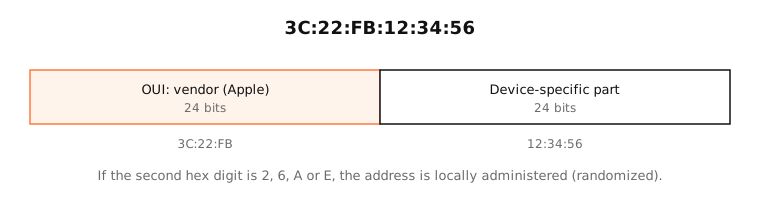
A MAC (media access control) address is the 48-bit hardware address of a network interface, written like 3C:22:FB:12:34:56. Devices use it to deliver data on the local network. The first half identifies the manufacturer; it isn't sent beyond your router.
How it works
On Ethernet and Wi-Fi, every frame carries a source and a destination MAC address. Switches and access points use them to deliver frames to the right device on the local network.
IP addresses and MAC addresses work together:
- Your Mac wants to reach 192.168.1.1 (the router).
- It asks the local network, with ARP, which MAC address has that IP.
- The router answers with its MAC, and your Mac sends frames to it.
Routers rewrite the MAC addresses at every hop. So a MAC address never leaves your local network: websites see your IP address, not your MAC.
The format
- 48 bits, written as six pairs of hex digits:
3c:22:fb:12:34:56(macOS),3C-22-FB-12-34-56(Windows) or3c22.fb12.3456(Cisco). - The first three bytes are the OUI (organizationally unique identifier), assigned by the IEEE to a manufacturer.
- The last three bytes are set by the manufacturer for each interface.
Two special bits
- The lowest bit of the first byte marks multicast (1) or unicast (0).
- The second-lowest bit marks a locally administered address (1), one not assigned by a vendor. Randomized private addresses set it, which is why their second hex digit is always 2, 6, A or E.
Examples
| Address | What it tells you |
|---|---|
bc:d0:74:69:53:ec |
Universally administered; prefix bc:d0:74 is registered to Apple |
a6:c7:2b:7c:db:e4 |
Second digit 6: locally administered, a private Wi-Fi address |
ff:ff:ff:ff:ff:ff |
The broadcast address: every device on the network |
01:00:5e:00:00:fb |
Multicast (Bonjour/mDNS over IPv4) |
On a Mac
System Settings › Network › Wi-Fi › Details shows the Wi-Fi address this network sees. Since macOS 15, that's usually a private address unique to the network; the Private Wi-Fi address setting there chooses Fixed, Rotating or Off.
In Terminal:
networksetup -getmacaddress Wi-Fiprints the hardware address.ifconfig en0 | grep etherprints the address in use right now.arp -alists the MAC addresses of devices your Mac recently talked to.
See it in the app
LightAtom's connections view shows which local devices your Mac talks to; look up their MAC prefixes in the MAC address lookup to identify the makers.
Frequently asked questions
What is a MAC address used for?
Delivering data on the local network. Switches and Wi-Fi access points use MAC addresses to send frames to the right device; IP addresses handle routing between networks.
Can someone track me by my MAC address?
Only on networks you join or are near, which is why Apple, Google and Microsoft randomize Wi-Fi MAC addresses. Websites never see your MAC address.
What is a private Wi-Fi address on a Mac?
A random, locally administered MAC address macOS uses for a specific network instead of the hardware address, to make tracking across networks harder.
What is the difference between a MAC address and an IP address?
A MAC address identifies a network interface on the local link and is (usually) fixed. An IP address identifies a device's position on a network, changes between networks, and is what the internet routes on.
Is the Mac in MAC address related to Apple?
No. MAC stands for media access control, a layer of the network stack. Every device has MAC addresses, not just Macs.