ARP (Address Resolution Protocol) finds the MAC address that belongs to an IP address on the local network. Your Mac broadcasts “who has 192.168.1.1?”, the owner replies with its MAC address, and the answer is cached in the ARP table for a while.
How it works
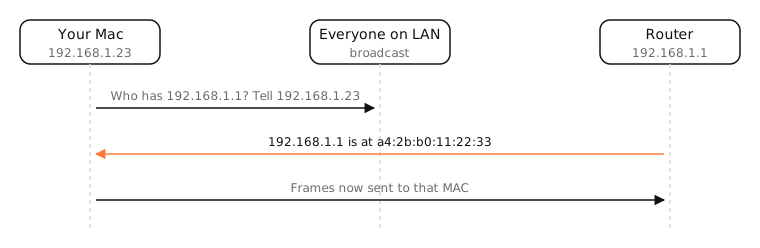
IP addresses say where a packet is going; on Ethernet and Wi-Fi, the frame that carries it must be addressed to a MAC address. ARP bridges the two.
- Your Mac wants to send to 192.168.1.1 (or to the internet, which means sending to the router).
- It checks its ARP cache. If the MAC isn't there, it broadcasts an ARP request to everyone on the subnet.
- The device with that IP replies directly with its MAC.
- Your Mac caches the answer (macOS keeps entries for about 20 minutes) and sends the frame.
For any address outside your subnet, your Mac ARPs only for the router: the router handles the rest.
ARP spoofing
ARP has no authentication: any device can claim any IP. An attacker on the same network can answer “192.168.1.1 is at my MAC” and sit in the middle of your traffic. HTTPS and VPNs protect the contents; managed networks use features like dynamic ARP inspection.
IPv6
IPv6 doesn't use ARP. It uses Neighbor Discovery (NDP) over ICMPv6 instead.
Examples
$ arp -a
router.lan (192.168.1.1) at a4:2b:b0:11:22:33 on en0 ifscope [ethernet]
iphone.lan (192.168.1.24) at b6:47:a4:5d:51:c9 on en0 ifscope [ethernet]
The iPhone's MAC begins with b6: the second hex digit (6) marks a locally administered, randomised “private Wi-Fi address”.
On a Mac
arp -alists the ARP cache;ndp -ashows the IPv6 neighbours.sudo arp -d -aclears the cache, a quick fix after replacing a router that kept its IP.- Two IPs with the same MAC in
arp -a(other than the router itself) can be a sign of spoofing.
See it in the app
LightAtom's connections view shows connections to devices on your local network alongside internet connections.
Frequently asked questions
What does ARP do?
It maps an IP address on your local network to the MAC address of the device using it, so frames can be delivered.
How do I see the ARP table on a Mac?
Run arp -a in Terminal. It lists each IP, its MAC address and the interface.
What is ARP spoofing?
An attack where a device sends fake ARP replies to impersonate another device, usually the router, to intercept traffic on the local network.
Does IPv6 use ARP?
No. IPv6 uses Neighbor Discovery Protocol over ICMPv6 for the same job.