The TCP/IP model is the four-layer model the internet is built on: link (Ethernet, Wi-Fi), internet (IP), transport (TCP, UDP) and application (HTTP, DNS, SSH). Each layer adds its own header to data on the way out and removes it on the way in.
How it works
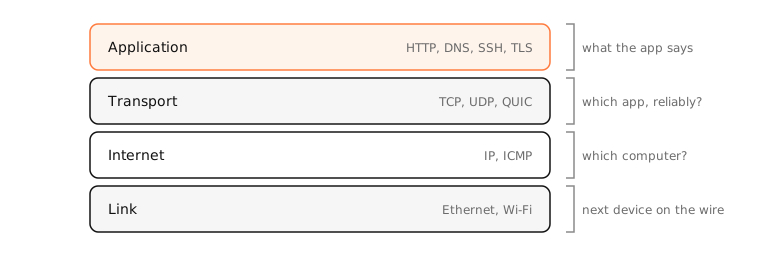
The layers
- Application: what the program says: an HTTP request, a DNS query, an SSH session. TLS encryption sits here too.
- Transport: gets data to the right app on the right computer, using ports. TCP adds reliability; UDP is lightweight; QUIC builds reliability on UDP.
- Internet: gets packets from one computer to another across networks, using IP addresses and routing. ICMP reports errors.
- Link: moves frames to the next device on the same physical network, using MAC addresses: Ethernet, Wi-Fi.
Encapsulation
When Safari loads a page, the HTTP request is wrapped in a TCP segment (adding ports), then an IP packet (adding addresses), then an Ethernet or Wi-Fi frame (adding MAC addresses). Each router unwraps the frame, reads the IP header, and rewraps the packet for the next link. The receiving computer unwraps all the way up to the web server.
TCP/IP vs OSI
The OSI model splits the same functions into seven layers. TCP/IP's application layer covers OSI's application, presentation and session layers, and its link layer covers OSI's data link and physical layers. TCP/IP describes how the internet actually works; OSI is mostly a teaching and vocabulary tool (“a layer 7 load balancer”).
Side by side
| TCP/IP layer | OSI layers | Examples | Address used |
|---|---|---|---|
| Application | 7 Application, 6 Presentation, 5 Session | HTTP, DNS, SSH, TLS | — |
| Transport | 4 Transport | TCP, UDP, QUIC | Port |
| Internet | 3 Network | IPv4, IPv6, ICMP | IP address |
| Link | 2 Data link, 1 Physical | Ethernet, Wi-Fi | MAC address |
Examples
Loading https://apple.com, layer by layer:
- Application: DNS lookup for apple.com, then TLS and an HTTP GET.
- Transport: TCP from your port 52344 to port 443 (or QUIC over UDP).
- Internet: IP packets from 192.168.1.23, translated by your router, to 17.253.144.10.
- Link: Wi-Fi frames from your Mac's MAC address to your router's.
On a Mac
You can see each layer with built-in tools: ifconfig (link: interfaces and MAC addresses), netstat -rn (internet: routes), lsof -i (transport: ports and connections) and curl -v (application: the HTTP exchange). tcpdump shows all of them inside each captured packet.
See it in the app
LightAtom's connections view works at the transport layer, every TCP and UDP socket per app, and adds the application-layer domain name from DNS.
Frequently asked questions
What are the four layers of the TCP/IP model?
Link, internet, transport and application. Some books split link into physical and data link, giving five.
What is the difference between the TCP/IP and OSI models?
OSI has seven layers and is mostly used for teaching and terminology. TCP/IP has four layers and describes the protocols the internet actually uses.
Is TCP/IP the same as TCP?
No. TCP/IP is the whole protocol suite and model. TCP is one transport protocol within it.
Where does TLS fit in the TCP/IP model?
Between transport and application: it runs on top of TCP and secures the application protocol, so it's usually counted in the application layer.