A modem connects your home to your internet provider's network over cable, DSL or fiber. A router connects your devices to each other and shares that single internet connection between them, usually over Wi-Fi. Many ISP-supplied gateways combine both in one box.
How it works
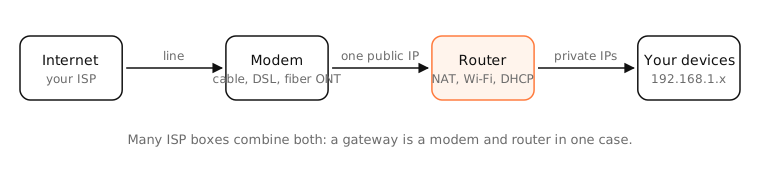
The modem: your link to the ISP
“Modem” comes from modulator-demodulator. It translates between your provider's line (coaxial cable, a phone line, or fiber via an ONT) and Ethernet. On the provider's side it's one device with one public IP address. A modem alone connects one device to the internet.
The router: your home network
The router sits behind the modem and does several jobs:
- NAT (network address translation): it shares the one public IP among all your devices by translating their private addresses (192.168.x.x).
- DHCP: it hands each device a private IP address, the subnet mask, and the DNS server to use.
- Routing and firewall: it forwards traffic between your network and the internet and blocks unsolicited inbound connections.
- Wi-Fi access point: most home routers broadcast your Wi-Fi network too.
Combo boxes
Most ISPs supply a gateway: modem, router and Wi-Fi in one. You can usually put it in bridge mode, which turns off its router part, if you want to use your own router or a mesh system.
Side by side
| Modem | Router | |
|---|---|---|
| Connects | Your home to the ISP | Your devices to each other and the modem |
| IP address | Gets your one public IP | Hands out private IPs (DHCP) |
| Wi-Fi | No (unless a combo) | Usually yes |
| Security | None of its own | NAT and a basic firewall |
| Can you skip it? | No, you need it for the ISP's line | Only with a single device |
Examples
- Cable internet: a DOCSIS cable modem plugs into the coax outlet; your Wi-Fi router plugs into the modem's Ethernet port.
- Fiber: an ONT (optical network terminal) on the wall does the modem's job.
- 5G home internet: the 5G gateway is a modem and router in one, usually behind carrier-grade NAT.
On a Mac
Open System Settings › Network › Wi-Fi › Details › TCP/IP: the Router field is your router's address (often 192.168.1.1 or 10.0.0.1). If your Mac's own address is private (192.168.x.x, 10.x.x.x) there's a router doing NAT between you and the modem.
Run traceroute -n 1.1.1.1: hop 1 is your router. If hop 2 is also a private address, you might have two routers in a row (“double NAT”), common when an ISP gateway isn't in bridge mode.
See it in the app
LightAtom's Map draws an arc from your home to every server your apps talk to.
Frequently asked questions
Do I need both a modem and a router?
You need a modem to connect to your ISP and a router to share the connection with more than one device and run Wi-Fi. Many ISP gateways do both in one box.
Is my Wi-Fi box a modem or a router?
If it plugs into the cable, phone line or fiber terminal and also broadcasts Wi-Fi, it's a combination gateway. If it plugs into another box with an Ethernet cable, it's a router.
What is bridge mode?
A setting on combo gateways that turns off the router part, so the box acts as a modem only and your own router does routing, Wi-Fi and NAT.
Does the router or the modem affect Wi-Fi speed?
Wi-Fi speed and coverage depend on the router (or access points). The modem and your plan limit the internet speed itself.