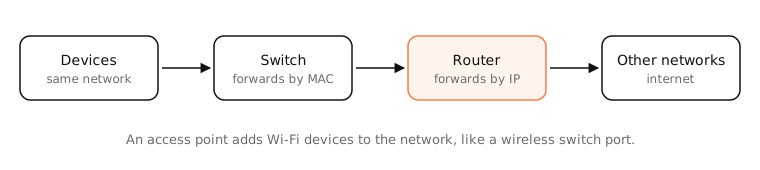
A switch connects devices on the same network and forwards data between them by MAC address. A router connects different networks, such as your home network and the internet, forwarding by IP address and usually doing NAT. An access point adds Wi-Fi devices to a network; a hub is an old, dumb switch.
How it works
Switch (layer 2)
A switch learns which MAC address is on which port and sends each frame only to the port where its destination is. Every port gets full speed in both directions. Switches don't care about IP addresses. A switch extends one network: plug in more devices.
Router (layer 3)
A router has interfaces on different networks and forwards packets between them based on IP addresses and its routing table. A home router also does NAT, DHCP, a firewall and usually Wi-Fi.
Access point
An access point bridges wireless devices onto a wired network. It's like a switch port for Wi-Fi devices; it doesn't route between networks itself.
Hub
A hub repeats every frame to every port, so devices share the bandwidth and collide. Switches replaced hubs decades ago.
Your home “router”
It's usually all of these in one box: a router, a small switch (the LAN ports), and an access point, often plus a modem.
Side by side
| Hub | Switch | Access point | Router | |
|---|---|---|---|---|
| Connects | Devices (shared) | Devices in one network | Wi-Fi devices to a network | Different networks |
| Forwards by | Nothing: repeats everything | MAC address | MAC address | IP address |
| NAT, DHCP, firewall | No | No | No | Usually yes |
| Layer | 1 | 2 | 2 | 3 |
Examples
- Out of LAN ports on your router? Add an unmanaged gigabit switch; all devices stay on the same network.
- Weak Wi-Fi in an office room with an Ethernet run? Add an access point there.
- Two separate networks (home and a lab) that need to talk? That needs a router.
On a Mac
Your Mac only sees the router as its default gateway (System Settings › Network › Details › TCP/IP › Router). Switches and access points are invisible to IP: traceroute doesn't show them as hops, because they don't route.
See it in the app
LightAtom's connections view shows local devices your Mac talks to through your switches and access points, and internet traffic going through the router.
Frequently asked questions
What is the difference between a switch and a router?
A switch connects devices within one network using MAC addresses. A router connects separate networks, like your LAN and the internet, using IP addresses.
Do I need a switch if I have a router?
Only if you need more wired ports than your router has. Plug an inexpensive switch into one router port to add more.
Is an access point the same as a router?
No. An access point adds Wi-Fi to an existing network. A router creates the network and connects it to others. Many routers include an access point.
Are hubs still used?
Rarely. Switches are cheap and far better. “USB hub” is a different thing entirely.