Mesh Wi-Fi is a system of several access points (nodes) that work together as one network with a single name and password. The nodes pass traffic between each other and hand your devices to the nearest node as you move, giving even coverage in homes too big for one router.
How it works
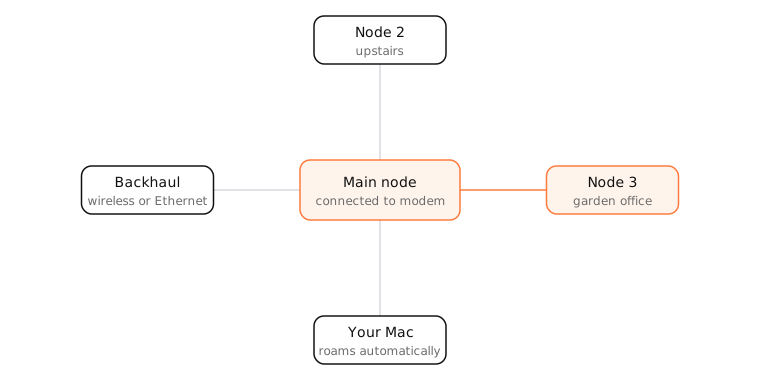
- The main node connects to your modem and acts as the router.
- Satellite nodes connect back to it over backhaul: either Wi-Fi (often a dedicated radio band) or, ideally, Ethernet cable.
- All nodes broadcast the same SSID, and the system helps devices roam to the strongest node using standards like 802.11k/v/r.
Mesh vs extenders
A traditional range extender repeats the router's signal, often with a different network name, and halves the available speed because it receives and retransmits on the same radio. Mesh systems coordinate centrally, use dedicated backhaul, and present one seamless network.
Wired backhaul
Connecting nodes with Ethernet frees up all the Wi-Fi capacity for your devices and gives the best speed and latency. If your house has Ethernet runs, use them.
Examples
- A two-storey house with the router in the basement: a satellite node on each floor removes dead spots.
- A garden office 30 metres away: a node with an Ethernet run or a strong wireless link brings full-speed Wi-Fi out there.
On a Mac
Option-click the Wi-Fi icon to see the BSSID (the specific node radio you're connected to) and RSSI. Walking around and watching the BSSID change confirms your Mac roams between nodes. Wireless Diagnostics › Window › Scan lists every node broadcasting your network.
See it in the app
When your Mac roams between mesh nodes, LightAtom's connections view keeps showing the same connections; drops and reconnections point to roaming problems.
Frequently asked questions
Do I need mesh Wi-Fi?
If one router leaves weak spots in your home, especially across floors or thick walls, yes. In a small apartment, a single good router is usually enough.
Is mesh Wi-Fi faster than a router?
Not at the router itself, but everywhere else in the house it's usually much faster, because devices connect to a nearby node.
What is wired backhaul?
Connecting mesh nodes with Ethernet instead of Wi-Fi. It's faster and more reliable, and leaves the wireless bands free for devices.
Do Macs work well with mesh?
Yes. Macs support the roaming standards mesh systems use. Keep one network name across nodes so macOS can roam smoothly.