An SSID (Service Set Identifier) is the name of a Wi-Fi network, like “Home” or “Café Guest”, up to 32 bytes long. Access points broadcast it so devices can find the network; your device stores it with the password to join automatically next time.
How it works
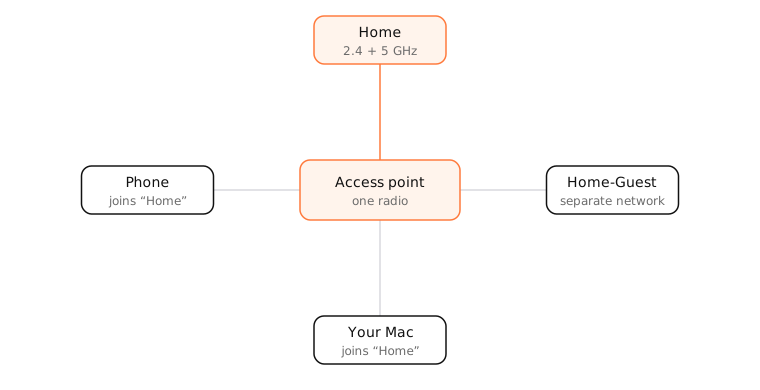
Access points send beacon frames several times a second announcing their SSID, security type and capabilities. Your Mac listens for beacons (and sends probe requests) to build the list of available networks.
- One SSID, many access points: mesh systems and offices use the same SSID on every access point so devices can roam between them.
- One access point, several SSIDs: a router can broadcast separate networks, such as a main network and a guest network, each with its own password and often its own subnet.
- Bands: a router may use the same SSID for 2.4 GHz and 5 GHz (devices choose) or separate names (“Home-5G”).
Hidden SSIDs
A hidden network doesn't include its name in beacons. It's not a security feature: the name still appears in other traffic, and devices that have joined it keep asking for it by name everywhere they go, which can reveal it.
What an SSID doesn't do
The SSID is just a label. Security comes from the encryption (WPA2 or WPA3) and the password.
Examples
- Home and Home-Guest: two SSIDs on one router, separating guests from your devices.
- Home on three mesh points: one SSID, devices roam.
- xfinitywifi, eduroam: well-known SSIDs used by thousands of networks; devices auto-join any of them, which is why they're common targets for fake hotspots.
On a Mac
- Click the Wi-Fi icon in the menu bar to see nearby SSIDs; the connected one is highlighted.
- System Settings › Wi-Fi lists known networks; ⋯ next to one lets you forget it or turn off Auto-Join.
- Option-click the Wi-Fi icon to see the BSSID (the access point's MAC address), channel and security of the current network.
- In Terminal,
sudo wdutil infoshows details; macOS hides the SSID from command-line tools without location permission.
See it in the app
LightAtom's connections view keeps a live list of your Mac's connections, so you can see them drop and resume when you switch between SSIDs.
Frequently asked questions
What is an SSID on a router?
The Wi-Fi network name your router broadcasts. You can change it in the router's settings.
Is hiding my SSID safer?
No. Hidden networks are easy to discover and make your devices broadcast the name when away from home. Use WPA2 or WPA3 with a strong password instead.
What is the difference between SSID and BSSID?
The SSID is the network name. The BSSID is the MAC address of a specific access point radio broadcasting it; mesh networks have one SSID and several BSSIDs.
Should 2.4 GHz and 5 GHz have the same SSID?
Using one name lets devices pick the best band automatically, which suits most homes. Separate names help when a device must stay on 2.4 GHz, such as some smart-home gadgets.