Wi-Fi uses three frequency bands. 2.4 GHz travels further and through walls but is slow and crowded; 5 GHz is much faster with more channels but shorter range; 6 GHz, added by Wi-Fi 6E and 7, is the fastest and least crowded but has the shortest range.
How it works
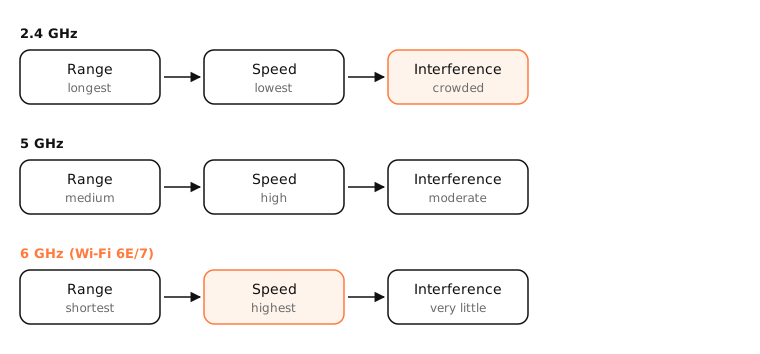
Range vs speed
Lower frequencies pass through walls and travel further, so 2.4 GHz covers more of a house. Higher frequencies carry more data but weaken faster with distance and obstacles.
Channels and interference
- 2.4 GHz has only three non-overlapping 20 MHz channels (1, 6, 11), shared with neighbours, Bluetooth, microwaves and baby monitors.
- 5 GHz has many more channels, and wider ones (80 or 160 MHz) for higher speeds. Some channels (DFS) must avoid radar.
- 6 GHz adds a large, clean band only Wi-Fi 6E and Wi-Fi 7 devices can use.
Wi-Fi generations
Wi-Fi 4 (802.11n), 5 (ac), 6 (ax), 6E (ax on 6 GHz) and 7 (be). Wi-Fi 6E is Wi-Fi 6 extended into the 6 GHz band; Wi-Fi 7 adds wider 320 MHz channels and multi-link operation.
WPA3
WPA3 is the current Wi-Fi security standard, with stronger protection against password guessing. The 6 GHz band requires WPA3.
Side by side
| 2.4 GHz | 5 GHz | 6 GHz | |
|---|---|---|---|
| Range | Longest | Medium | Shortest |
| Speed | Lowest | High | Highest |
| Interference | High | Moderate | Low |
| Wide channels | No (20/40 MHz) | Yes (80/160 MHz) | Yes (up to 320 MHz with Wi-Fi 7) |
| Needs | Any Wi-Fi device | Most devices since ~2012 | Wi-Fi 6E/7 device and router |
Examples
- Laptop in the same room as the router: 5 GHz or 6 GHz for the best speed.
- Smart plug in the garage: 2.4 GHz, because range matters more than speed, and many smart devices only support it.
- Crowded apartment block: 5 GHz or 6 GHz avoids the neighbours' 2.4 GHz traffic.
On a Mac
Option-click the Wi-Fi icon: the Channel line shows the band and width, such as 36 (5 GHz, 80 MHz) or 6 GHz. Macs with Wi-Fi 6E (and later) support the 6 GHz band; check System Information › Network › Wi-Fi for supported PHY modes. Wireless Diagnostics › Window › Scan lists nearby networks per band.
See it in the app
After moving your Mac to a faster band, LightAtom's connections view shows the higher download and upload rates as apps use them.
Frequently asked questions
Should I use 2.4 GHz or 5 GHz?
Use 5 GHz (or 6 GHz) when you're reasonably close to the router, for speed and less interference. Use 2.4 GHz for far-away devices and smart-home gadgets that need range.
What is the difference between Wi-Fi 6 and Wi-Fi 6E?
Wi-Fi 6E is Wi-Fi 6 with access to the 6 GHz band, which offers more and wider channels with little interference. Both the device and router must support it.
What is WPA3?
The newest Wi-Fi security standard. It protects better against password-guessing attacks and is required on 6 GHz.
Why does my 5 GHz Wi-Fi drop in some rooms?
5 GHz weakens faster through walls and over distance. Move the router, add a mesh node, or let devices fall back to 2.4 GHz there.