A VLAN (virtual LAN) divides one physical network into separate logical networks. Devices in different VLANs can't talk directly even when plugged into the same switch; traffic between them must go through a router or firewall. Each VLAN is usually its own IP subnet.
How it works
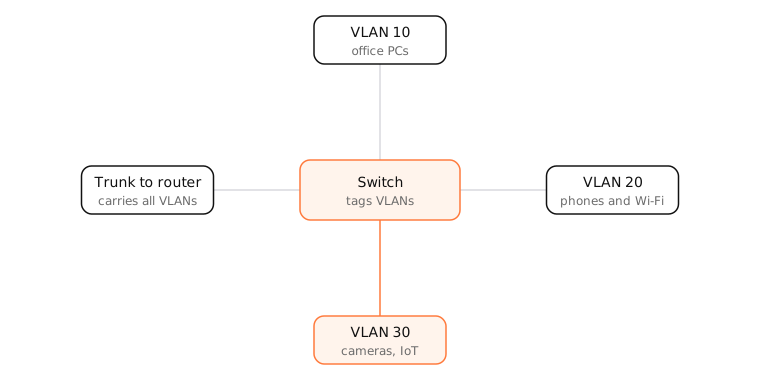
Switches keep a separate forwarding table and broadcast domain for each VLAN, so a broadcast in VLAN 20 never reaches VLAN 30.
Access and trunk ports
- An access port belongs to one VLAN. A device plugged into it doesn't know VLANs exist.
- A trunk port carries several VLANs between switches, routers and access points. Each frame gets an 802.1Q tag, a 4-byte field with the VLAN ID (1–4094).
Why use VLANs
- Security: keep cameras and smart-home devices away from your computers.
- Guest networks: a guest Wi-Fi SSID maps to its own VLAN.
- Performance: smaller broadcast domains.
- Flexibility: group devices by role, not by which switch they're on.
Routing between VLANs happens on a router or layer-3 switch, where firewall rules decide what's allowed.
Examples
A home with a prosumer router might use:
| VLAN | Subnet | Devices |
|---|---|---|
| 1 (default) | 192.168.1.0/24 | Computers, phones |
| 20 | 192.168.20.0/24 | Guest Wi-Fi |
| 30 | 192.168.30.0/24 | Cameras, smart plugs (no access to VLAN 1) |
On a Mac
Macs normally sit on an access port and don't see VLAN tags. You can create a tagged VLAN interface in System Settings › Network › ⋯ › Manage Virtual Interfaces › New VLAN, choosing the parent interface and VLAN ID, which is useful for network admins. In ifconfig it appears as vlan0.
See it in the app
LightAtom shows which local devices your Mac talks to; if a camera or smart device on another VLAN still appears there, traffic between your VLANs is being allowed.
Frequently asked questions
What is a VLAN used for?
Separating devices into different networks on the same hardware: guests from staff, cameras from computers, phones from servers.
Do I need VLANs at home?
Not usually. Many routers' guest networks and IoT networks use VLAN-like separation behind the scenes. Prosumer setups use explicit VLANs to isolate smart-home devices.
Is a VLAN the same as a subnet?
No, but they usually go together: a VLAN separates traffic at layer 2, and each VLAN normally gets its own IP subnet at layer 3.
What is 802.1Q?
The standard for VLAN tagging on Ethernet: a 4-byte tag in each frame identifies its VLAN on trunk links.