Ethernet is the family of standards for wired local networks, using cables with RJ45 connectors to link computers, switches and routers. It carries data in frames addressed by MAC address, at speeds from 100 Mbps to 10 Gbps and beyond, with lower latency and fewer dropouts than Wi-Fi.
How it works
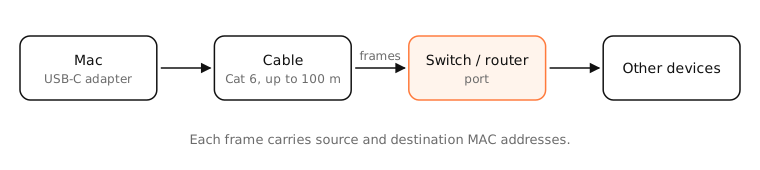
Devices send data in frames, each with a source and destination MAC address. A switch learns which device is on which port and forwards frames only where they need to go, so many devices can talk at full speed at once (full duplex).
Speeds and cables
| Standard | Speed | Typical cable |
|---|---|---|
| Fast Ethernet | 100 Mbps | Cat 5 |
| Gigabit Ethernet | 1 Gbps | Cat 5e or Cat 6 |
| 2.5/5GBASE-T | 2.5–5 Gbps | Cat 5e or Cat 6 |
| 10GBASE-T | 10 Gbps | Cat 6a |
Copper Ethernet runs up to 100 metres per cable. Both ends negotiate the fastest speed they share.
Ethernet vs Wi-Fi
Wi-Fi shares the air between all devices and suffers from interference and distance. Ethernet gives each device its own dedicated link, so it's more consistent: lower latency, almost no jitter or packet loss, and full speed regardless of where you sit.
Side by side
| Ethernet | Wi-Fi | |
|---|---|---|
| Latency | Lowest, steady | A few ms more, varies |
| Reliability | Very high | Affected by walls, interference, distance |
| Speed | Full link speed (1 Gbps+) | Depends on signal and standard |
| Convenience | Needs a cable | Anywhere in range |
| Best for | Desktops, gaming, calls, big transfers | Laptops, phones, moving around |
Examples
- A Mac mini wired to the router gets a consistent 1 Gbps; on Wi-Fi in another room it might see 200–400 Mbps with occasional spikes in latency.
- Plugging in Ethernet during an important video call removes most Wi-Fi-related stutter.
On a Mac
Most MacBooks need a USB-C or Thunderbolt Ethernet adapter; Mac mini, iMac (some models) and Mac Studio have a built-in port. The adapter appears in System Settings › Network as its own service. Put it above Wi-Fi with ⋯ › Set Service Order so the Mac prefers the cable.
ifconfig shows Ethernet interfaces as en1, en2… with media: autoselect (1000baseT <full-duplex>) for a gigabit link.
See it in the app
LightAtom keeps tracking connections when your Mac switches from Wi-Fi to Ethernet, so you can see apps reconnect over the new interface.
Frequently asked questions
Is Ethernet faster than Wi-Fi?
Usually yes, and it's more consistent. A gigabit Ethernet link delivers close to 1 Gbps with steady low latency; Wi-Fi speed varies with signal and interference.
Do I need an adapter for Ethernet on a MacBook?
Yes. Current MacBooks have no Ethernet port; use a USB-C or Thunderbolt Ethernet adapter or a dock with an Ethernet port.
What Ethernet cable should I buy?
Cat 6 handles gigabit and 2.5 Gbps comfortably and is cheap. Cat 6a for 10 Gbps runs.
Can I use Ethernet and Wi-Fi at the same time on a Mac?
Yes. Both stay connected; macOS sends traffic through the service highest in the service order.