Bufferbloat is excessive latency caused by oversized packet queues in routers and modems. When a link is busy, packets wait in a long queue, so latency jumps from 20 ms to hundreds of milliseconds. It makes calls and games lag whenever someone else is uploading or downloading.
How it works
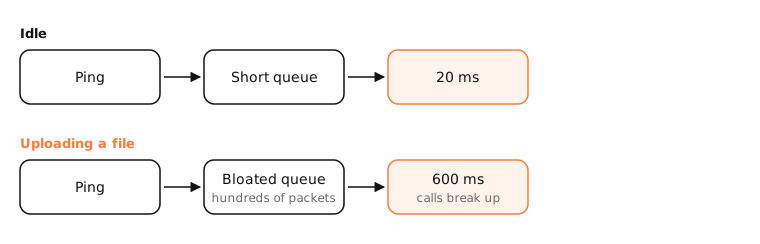
Why buffers bloat
Routers buffer packets so short bursts aren't dropped. Many devices, especially cable modems and cheap routers, have buffers far larger than needed. TCP keeps sending until it sees loss, so a big upload fills the whole buffer, and every other packet, your call audio included, waits behind it.
At 20 Mbps upload, a 1 MB buffer adds 400 ms of delay.
Symptoms
- Calls break up when someone uploads photos, a backup runs, or a game downloads.
- Gaming lag spikes when anyone streams.
- Speed test shows good speeds, but latency under load is high.
The fix: smart queue management
SQM algorithms (fq_codel, CAKE) keep queues short and give each flow a fair turn. Set your router's SQM or QoS to about 90–95% of your real speed so the queue forms in the router, where it's managed, rather than in the modem. Some ISPs and modems (DOCSIS 3.1 with AQM) now include it.
Other fixes: a router that supports SQM (many mesh systems and OpenWrt), limiting upload speed in backup apps, or scheduling big transfers.
Examples
$ networkQuality
Uplink capacity: 20.4 Mbps
Downlink capacity: 312.8 Mbps
Responsiveness: Low (122 RPM)
Idle Latency: 18.5 milliseconds
Good speeds, low responsiveness: the network has bufferbloat. Over 1,000 RPM (round trips per minute) is high.
On a Mac
networkQuality (built into macOS) measures responsiveness in RPM, round trips per minute while the link is loaded, which is a direct bufferbloat measure. Run ping 1.1.1.1 in one window while uploading a big file in another to see the latency spike yourself.
See it in the app
LightAtom shows which app is saturating your upload, often a backup or cloud sync, when latency spikes.
Frequently asked questions
What is bufferbloat?
High latency caused by overly large network buffers filling up when your connection is busy.
How do I test for bufferbloat?
Measure latency while the connection is loaded: run networkQuality on a Mac, or use a bufferbloat test that loads the link and pings at the same time.
How do I fix bufferbloat?
Enable SQM (fq_codel or CAKE) on your router, set to slightly below your real speeds. If your router lacks it, a newer router is the fix.
Does more bandwidth fix bufferbloat?
Not by itself. Faster links drain queues sooner, but oversized buffers still cause lag when they fill.