Latency is the time it takes for data to travel from your device to a server and back, measured in milliseconds (ms). Lower is better: under 30 ms feels instant, while above 100–150 ms makes calls, games and remote desktops noticeably laggy.
How it works
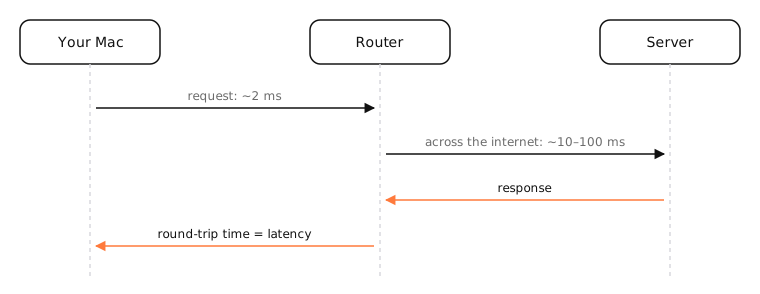
Latency adds up from several delays:
- Propagation: signals travel through fiber at about two-thirds of the speed of light, roughly 5 ms per 1,000 km each way. Distance sets a hard minimum.
- Transmission and processing: each router and device takes a little time to handle a packet.
- Queuing: when a link is busy, packets wait in buffers. This is the variable part, and it can grow to hundreds of milliseconds (bufferbloat).
- Last mile: Wi-Fi, cable, DSL and especially satellite and mobile links add their own delay.
Latency vs bandwidth
Bandwidth is how much data per second a connection can carry; latency is how long each trip takes. A huge pipe can still be slow to respond. Web pages, which need many small round trips, are often more sensitive to latency than to bandwidth.
Round trip vs one way
Tools like ping report round-trip time (RTT): there and back. One-way latency is roughly half, though paths can differ in each direction.
Examples
Typical round-trip times:
| Path | Latency |
|---|---|
| Mac to its Wi-Fi router | 1–10 ms |
| To a server in the same city | 5–20 ms |
| US East Coast to West Coast | 60–80 ms |
| New York to London | 70–90 ms |
| Geostationary satellite | 600+ ms |
| Starlink (low-orbit satellite) | 25–60 ms |
On a Mac
ping -c 10 1.1.1.1reports min, avg and max round-trip time.networkQualityshows idle latency and how far it rises under load (responsiveness).- Option-click the Wi-Fi icon for signal quality, a common source of extra latency.
See it in the app
LightAtom's Map shows where your connections go, a quick explanation for why some services feel slower: they're much further away.
Frequently asked questions
What is a good latency?
Under 30 ms is excellent, 30–60 ms good, up to 100 ms fine for most uses. Above 150 ms, calls and games feel laggy.
What is the difference between latency and ping?
Latency is the delay itself. Ping is the tool that measures round-trip latency, and people often call the result “ping”.
How can I reduce latency?
Use Ethernet instead of Wi-Fi, pick servers closer to you, stop uploads and downloads that fill your connection, and enable smart queue management on your router if latency spikes under load.
Does more bandwidth lower latency?
Not directly. More bandwidth means less queuing when you're busy, which can help, but distance and the path set the minimum.