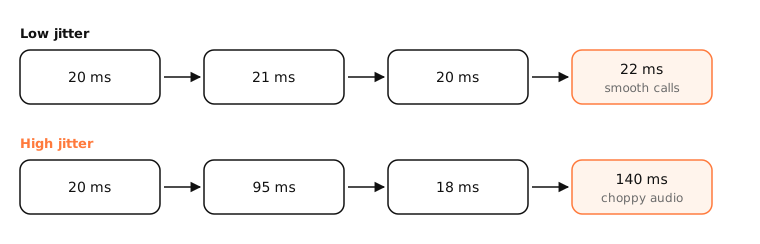
Jitter is the variation in latency between packets. If pings take 20, 21 and 20 ms, jitter is low; if they take 20, 95 and 18 ms, it's high. Real-time apps like calls and games suffer from high jitter even when the average latency looks fine.
How it works
Why it hurts
A video call sends a packet every 20 ms. If they arrive unevenly, the app must hold a jitter buffer to smooth them out, which adds delay, or play gaps, which sounds robotic. Games show it as rubber-banding.
How it's measured
Usually as the average difference between consecutive latency samples (the RFC 3550 method used by RTP), or simply as the standard deviation of ping times.
Rough guide
- Under 10 ms: excellent.
- 10–30 ms: fine for most calls and games.
- Over 30 ms: noticeable problems in real-time apps.
Common causes
- Wi-Fi: interference, distance and other devices competing for airtime.
- Bufferbloat: uploads or downloads filling router queues.
- Congested links at your ISP at busy times.
- Background traffic on your own Mac: backups, cloud sync, updates.
Fixes
Use Ethernet or move closer to the router, pause big transfers, enable SQM or smart queue management on the router, and check what's using bandwidth.
Examples
$ ping -c 20 -i 0.2 1.1.1.1 | tail -1
round-trip min/avg/max/stddev = 11.9/19.4/88.2/16.8 ms
An average of 19 ms looks good, but a max of 88 ms and a standard deviation of 17 ms show high jitter.
On a Mac
networkQuality -v reports responsiveness under load, a good jitter and bufferbloat signal. ping reports the standard deviation (stddev) on its last line. Hold ⌥ and click the Wi-Fi icon to see signal (RSSI) and noise.
See it in the app
LightAtom shows which apps are moving data while your call stutters, so you can spot a backup or sync competing for bandwidth.
Frequently asked questions
What is a good jitter?
Under 30 ms is acceptable for calls and games; under 10 ms is excellent.
What is the difference between latency and jitter?
Latency is how long a packet takes. Jitter is how much that time varies between packets.
Does Ethernet reduce jitter?
Usually yes. Wired connections avoid the interference and airtime contention that cause most jitter on Wi-Fi.
Can a VPN cause jitter?
It can, by adding a longer, busier path. It can also reduce it if your ISP's normal route is congested.