Packet loss happens when data packets travelling across a network don't reach their destination. It's measured as a percentage of packets sent. Under 1% is usually unnoticeable; 2% and above makes calls choppy and games lag, and forces TCP to resend data, slowing downloads.
How it works
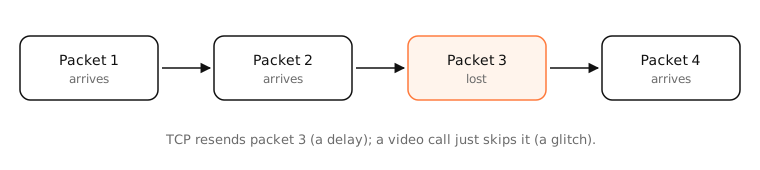
Data travels as packets, typically up to 1,500 bytes each. Every router and link along the way can drop packets when something goes wrong:
- Congestion: a router's queue is full, so new packets are dropped. This is the most common cause, and it's how TCP learns to slow down.
- Wireless interference: weak signal, other networks on the same channel, microwaves and walls corrupt Wi-Fi frames.
- Faulty hardware: a bad cable, port, modem or line produces errors.
- Overloaded devices: an old router or a busy server can't keep up.
What happens to lost packets
- TCP notices missing acknowledgements and resends them. You don't lose data, but you lose time, and TCP also slows its sending rate, so downloads get slower.
- UDP apps (calls, games, live video) usually skip lost packets: you hear a glitch or see a frozen frame.
Loss is often bursty: zero most of the time, then several packets in a row, which is why short tests can miss it.
Examples
ping -c 100 1.1.1.1 on a Mac ends with a summary like:
100 packets transmitted, 97 packets received, 3.0% packet loss
3% loss is enough to make a video call noticeably choppy. Run the same test against your router (often 192.168.1.1): if loss shows up there too, the problem is inside your home, usually Wi-Fi.
On a Mac
- Quick test:
ping -c 100 1.1.1.1and read the packet-loss line. - Wi-Fi quality: Option-click the Wi-Fi icon to see signal (RSSI) and noise; weak signal is a common cause.
- Interface errors:
netstat -ibshows input and output errors per interface; climbing error counts point to hardware or driver problems. - Responsiveness under load:
networkQualityshows whether latency spikes when the line is busy, a sign of bufferbloat that often comes with loss.
See it in the app
LightAtom's connections view shows live rates per app, so you can see whether a backup or download is saturating your connection while you test.
Frequently asked questions
What is an acceptable amount of packet loss?
0% is ideal. Under 1% is generally fine for browsing and streaming. Calls and games degrade at 1–2%, and above 5% most real-time apps struggle.
What causes packet loss on Wi-Fi?
Weak signal, interference from neighbouring networks or devices, too many devices on one access point, and distance or walls. Testing over Ethernet tells you if Wi-Fi is the cause.
Can packet loss be my ISP's fault?
Yes, if loss appears when pinging public servers but not your own router, and continues across different times of day. Run mtr or a packet loss test and share the results with your ISP.
Does packet loss affect download speed?
Yes. TCP treats loss as congestion and slows down, so even 1% loss can cut throughput noticeably on fast connections.