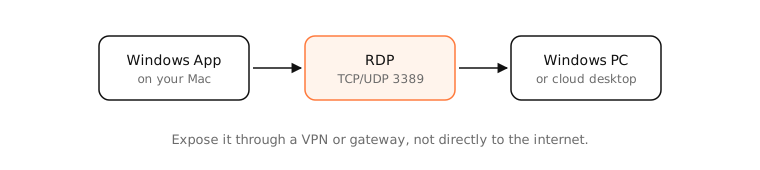
RDP (Remote Desktop Protocol) is Microsoft's protocol for using a Windows computer remotely: you see its screen and control it with your keyboard and mouse. It runs on TCP and UDP port 3389. On a Mac you connect with Microsoft's free Windows App (formerly Microsoft Remote Desktop).
How it works
How it works
RDP sends drawing commands and compressed screen updates from the Windows machine and sends your input back. It also redirects audio, clipboard, printers, drives and multiple monitors. Connections are encrypted with TLS and, by default, use Network Level Authentication (you sign in before a session starts).
The host needs a Windows Pro, Enterprise or Server edition with Remote Desktop enabled; Windows Home can connect out but can't be connected to.
Security
RDP exposed directly to the internet is one of the most attacked services: it's constantly scanned for weak passwords and unpatched vulnerabilities, a common route for ransomware. Instead:
- Reach it through a VPN or an RD Gateway, or use a cloud service (Azure Virtual Desktop, Windows 365).
- Keep NLA on, use strong passwords and MFA, and patch promptly.
RDP vs VNC and Screen Sharing
macOS's own Screen Sharing uses VNC-based protocols on port 5900. RDP is generally more efficient over slow links because it sends drawing instructions rather than just pixels.
Examples
- Working on a Windows-only accounting app from a MacBook through the Windows App.
- An admin connecting to a Windows server in a data centre over a VPN.
Check whether a host's RDP port answers:
$ nc -vz 192.168.1.60 3389
Connection to 192.168.1.60 port 3389 [tcp/ms-wbt-server] succeeded!
On a Mac
Install Windows App from the Mac App Store, add a PC by its name or IP, and connect. To control another Mac instead, use Screen Sharing (System Settings › General › Sharing).
See it in the app
LightAtom's connections view shows the Windows App's connection to port 3389 and how much data the session uses.
Frequently asked questions
What is RDP used for?
Using a Windows computer or server remotely, with its full desktop, apps and files, from another device.
What port does RDP use?
TCP and UDP port 3389 by default.
Can I use RDP on a Mac?
Yes. Install Microsoft's free Windows App from the Mac App Store to connect to Windows PCs and cloud desktops.
Is RDP secure?
It's encrypted, but exposing it directly to the internet is risky. Use a VPN or gateway, strong passwords, MFA and updates.