SNMP (Simple Network Management Protocol) lets a monitoring system read information from network devices, such as interface traffic counters, CPU load or printer toner levels, and receive alerts called traps. Devices run an SNMP agent on UDP port 161; traps go to port 162.
How it works
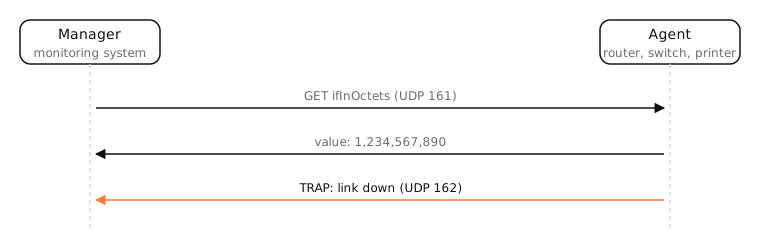
- Agents run on routers, switches, firewalls, printers, UPSes and servers.
- A manager (the monitoring system) polls agents with GET requests, usually every minute or so, and graphs the values.
- Agents send traps (or informs) to the manager when something happens, like a link going down.
Each value has an OID, a dotted number in a tree, such as 1.3.6.1.2.1.2.2.1.10 for an interface's received bytes. MIBs are the files that name and describe OIDs.
Versions
- SNMPv1 and v2c authenticate with a plain-text “community string”, often left as
public. Treat them as unauthenticated. - SNMPv3 adds proper authentication and encryption. Use it wherever devices support it.
Never expose SNMP to the internet: misconfigured agents leak device details and have been abused for amplification attacks.
Examples
- A monitoring dashboard showing your switch's port traffic is usually built on SNMP counters.
- A printer reports “toner low” to the print server via SNMP.
snmpwalk -v2c -c public 192.168.1.1 system(net-snmp tools) prints a router's name, uptime and description.
On a Mac
macOS includes the net-snmp command-line tools (snmpget, snmpwalk) for querying devices, though it doesn't run an SNMP agent by default. Many printer and network apps on the Mac use SNMP behind the scenes to read device status.
See it in the app
SNMP shows what a device reports about itself. LightAtom's connections view shows the traffic from your Mac's side, per app.
Frequently asked questions
What is SNMP used for?
Monitoring network devices: reading traffic counters, errors, CPU and status from routers, switches, printers and servers, and receiving alerts when something changes.
What port does SNMP use?
UDP 161 for requests to agents, and UDP 162 for traps sent to the manager.
Is SNMP secure?
SNMPv1 and v2c are not: community strings travel in plain text. SNMPv3 supports authentication and encryption.
What is an SNMP community string?
A shared password-like string in SNMPv1/v2c. Defaults like public are widely known, so change them or use SNMPv3.